Updated: December 19, 2025
You open the User Explorer report in GA4, looking for a specific user, and you notice something strange.
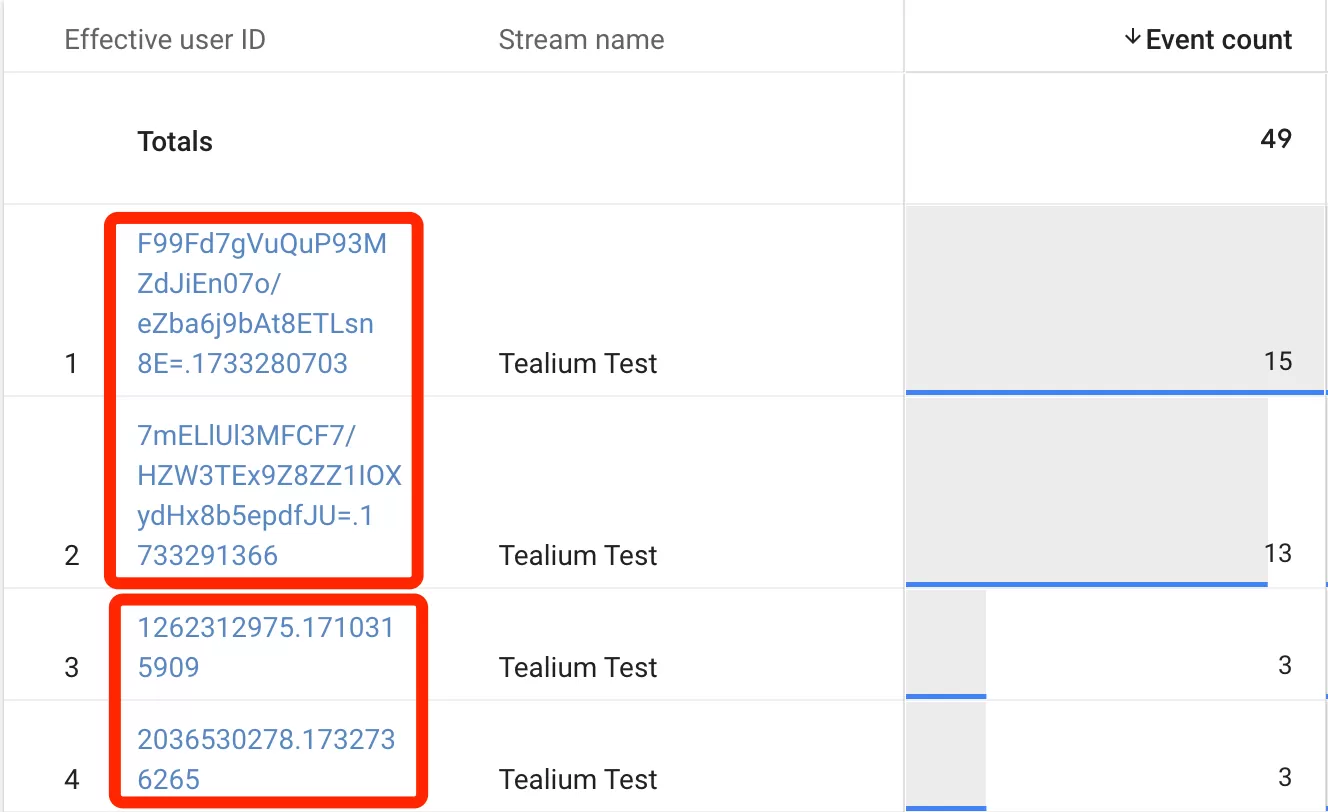
The user IDs don’t all look the same. Some are just a number. Others are a jumble of random characters with a timestamp tacked on the end. A few might even show a clean value that looks like something you set yourself.
If you’ve ever wondered why the Effective User ID column looks different across users, you’re not alone. I’ve had this question come up more times than I can count, and the answer is simpler than it looks — once you understand how GA4 decides what to display.
How Does GA4 Determine the Effective User ID?
GA4 follows a straightforward priority system when deciding what to show as the Effective User ID:
- If a User ID is implemented: GA4 displays the User ID you set. This is the value you pass via the user_id parameter — typically a logged-in user identifier from your own system.
- If no User ID is set: GA4 falls back to the Device ID, and this is where things get interesting, because the Device ID looks different depending on your platform and tracking method.
Here’s the breakdown:
| Platform / Setup | What GA4 Uses | Example |
|---|---|---|
| Mobile App | Instance ID | a1b2c3d4-e5f6-7890-abcd-ef1234567890 |
| Website (Client-Side) | Client ID | 1197596843.1673515099 |
| Website (Server-Side) | Client ID (extended format) | F99Fd7gVuQuP93MZdJiEn07o/eZba6j9bAt8ETLsn8E=.1733280703 |
So when you’re browsing through User Explorer and the IDs look inconsistent, that’s why. Some users have a User ID configured, some don’t. And among the ones that don’t, the Device ID structure changes based on whether you’re using client-side or server-side tagging.
Client-Side Tracking vs Server-Side Tracking
The difference between client-side and server-side tracking is visible right in the Effective User ID.
Client-side tracking generates a Client ID that’s a random number combined with a Unix timestamp, separated by a dot. Something like:
1197596843.1673515099The number before the dot is random. The number after the dot is the timestamp of when the ID was first generated.
Server-side tracking (via the Google tag’s server-side container) generates a Client ID with a different structure. Instead of a simple random number, you get a longer character string — a hash — followed by a dot and a timestamp:
F99Fd7gVuQuP93MZdJiEn07o/eZba6j9bAt8ETLsn8E=.1733280703Both serve the same purpose — they uniquely identify a user on a device — but the format tells you which tracking path was used.
Effective User ID in BigQuery
If you’re using BigQuery exports, the Effective User ID maps directly to the user_pseudo_id field in your event tables. This is important because it means you can analyze users consistently across both the GA4 interface and your raw event data.
When you run a query like:
SELECT user_pseudo_id, COUNT(*) AS event_count
FROM `your-project.analytics_123456789.events_*`
GROUP BY user_pseudo_id
The values in user_pseudo_id will match what you see in the User Explorer’s Effective User ID column — whether that’s a User ID, a Client ID, or an Instance ID.
Effective User ID in GA4: Final Words
The Effective User ID is one of those concepts that looks confusing at first glance but makes perfect sense once you understand GA4’s fallback logic. User ID first, then Device ID. And the Device ID format tells you something about your own tracking setup — client-side or server-side, web or app — which is useful debugging information on its own.