Update time: January 5, 2025
If you’ve ever looked at GTM Preview mode and noticed a value called `ecid` in the data layer — or stumbled across a cookie named _ga_<container ID> with a long string of numbers — you might have wondered: what exactly is this, and how is it different from the regular Client ID?
That’s where Enhanced Client ID (ECID) comes in.
In this guide, I’ll walk you through what ECID is, how it differs from the standard Client ID, what the cookie values mean, and how to enable it in your GA4 setup.
Note: GA4 Enhanced Client ID is different from Adobe Experience Cloud ID (ECID). Adobe ECID is an identity service used by Adobe Experience Cloud products, while GA4 Enhanced Client ID is related to Google Analytics user identification.
What is Enhanced Client ID(ECID)?
Enhanced Client ID (abbreviated as `ecid`) is an improved identifier in GA4 that builds on the standard Client ID by incorporating additional signals — such as User ID and device information — to better recognize users across devices and platforms.
You’ve probably seen it in GTM Preview mode without realizing what it was. It shows up as a value called `ecid` in the data layer.
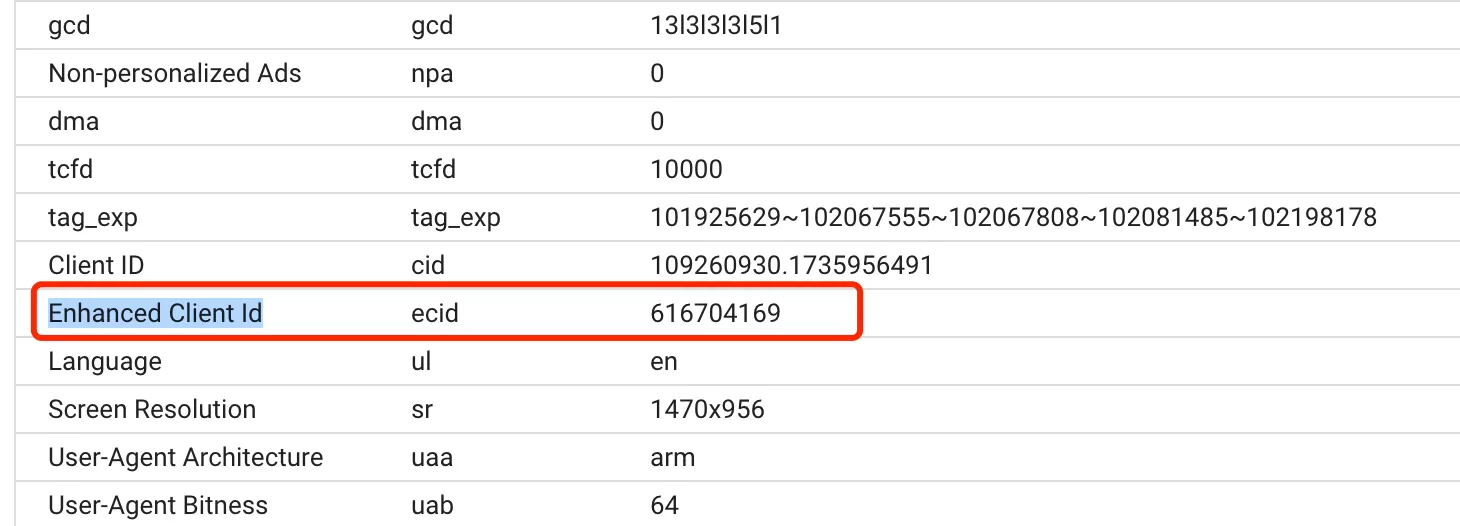
Here’s how it works: the standard Client ID (`_ga` cookie) identifies users within a single browser. ECID goes a step further — it combines the Client ID with other identifiers to improve cross-device and cross-platform tracking.
One important thing to remember: ECID is session-level. Every time a new session starts, GA4 generates a new Enhanced Client ID.
Enhanced Client ID Format
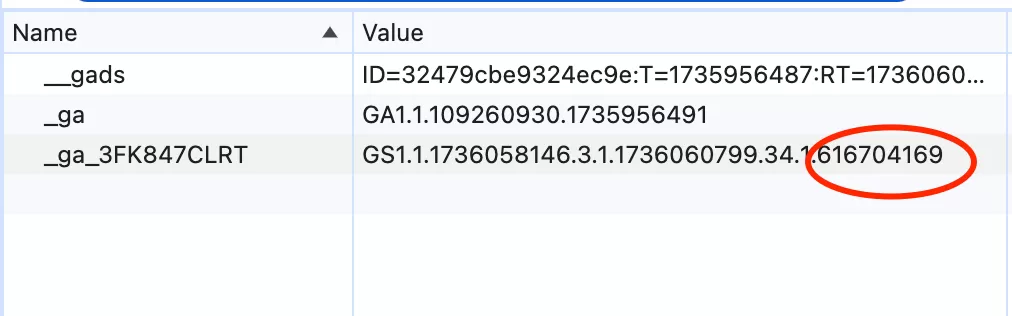
ECID is stored in the _ga_<container ID> cookie. If ECID hasn’t been generated yet, it may show as `0` in GTM Preview.
The cookie value looks something like this:

Here’s what each part means:
| Value | Description |
|---|---|
| GS | Fixed identifier (Google Session) |
| 2 | Analysis version (usually 1 or 2) |
| 1 | Domain level (almost always 1) |
| 1673933110 | Session ID (session start timestamp) |
| 12 | Session count for this user |
| 0 | Engagement session flag (1 = engaged, 0 = not) |
| 1673933110 | Current Timestamp |
| 60 | Countdown,60-second countdown, cookie and user data matching/syncing when Google Signals is enabled |
| 0 | User-ID status (1 = user is logged in with User-ID set) |
| 0 | Enhanced Client Id, Only populated with server-side tracking or when User-ID and user-provided data collection is enabled |
| riYSmWx3uWvuJEDkCvwJCnvET7QcvFq7kg | Google Signals identifier. Available when Google Signals data collection is enabled |
I won’t pretend this is easy to read at a glance — it took me a while to decode it myself. But the key fields to focus on are the Session ID (which tells you when the session started) and the Session count (how many times this user has visited).
How to enable Enhanced Client ID
There are two ways to generate an Enhanced Client ID:
Option 1: Enable User-ID and user-provided data collection
In GA4, click 「Admin」—— 「Property Settings」—— -「Data collection and modification」——「Data collection」and check 「User-ID and user-provided data collection」.
Option 2: Use GTM server-side deployment
If you’re running a server-side GTM setup, ECID is generated automatically as part of that implementation.
Once enabled, you can see ECID in the _ga_<container ID> cookie — it will show a value where it previously showed `0`.
Client ID VS Enhanced Client ID
Here’s a quick comparison to help you understand the difference:
|
Operation
|
Client ID
|
Enhanced Client ID
|
|---|---|---|
|
Definition
|
Unique identifier in GA4 for identifying users on the same device or browser
|
Improved identifier for identifying users across devices and platforms
|
|
Generation method
|
GA4 generates a unique Client ID for each device/browser on first visit
|
Built from the standard Client ID plus User ID and other identifiers (if available)
|
|
Storage
|
_ga cookie
|
_ga_<container ID> cookie
|
|
Purpose
|
Track user behavior within a single browser
|
Improve cross-device and cross-platform user tracking
|
Think of it this way: the Client ID tells you “this is the same browser.” The Enhanced Client ID tells you “this might be the same person, even on a different device.”
Final Words
Enhanced Client ID is one of those GA4 features that doesn’t get a lot of attention but plays an important role in cross-device tracking. If you’re running User-ID or server-side GTM, ECID is already working for you — giving you a more complete picture of user identity across different environments.
Here’s a quick recap:
- ECID builds on the standard Client ID with additional signals like User ID
- It’s stored in the `_ga_<container ID>` cookie
- It’s session-level — a new ECID is generated for each session
- Enable it through User-ID data collection or server-side GTM
- Check for a non-zero value in the cookie to confirm it’s active
I hope this guide helped you understand Enhanced Client ID in GA4. If you have questions about how ECID works in your specific setup, feel free to leave a comment and I’ll do my best to help.