Update time: Dec 19, 2024
If you’ve ever opened GA4 and wondered how it really tells one user from another, you’re not alone. The Client ID is the quiet workhorse behind most of your user counting — and it behaves very differently depending on whether you’re using client-side or server-side tagging. I’ve seen plenty of people get tripped up by that difference. Let me walk you through what it is, where it lives, and how to make it work for you.
What Is GA4 Client ID?
Client ID is an anonymous identifier that GA4 assigns to a specific browser. It allows GA4 to recognize returning visitors from the same browser over time.
For example, a visitor comes to your site today, leaves, and returns three days later. As long as they’re using the same browser and haven’t cleared cookies, GA4 knows it’s the same device.
Here’s the catch: If they switch browsers, use another device, clear cookies, or block cookie storage, GA4 generates a new Client ID. That same person can show up as multiple users in your reports. It’s a limitation worth keeping in mind.
How Is GA4 Client ID Generated?
When a user visits a website for the first time, Google tag loads, GA4 checks whether the browser already has the _ga cookie.
- If the `_ga` cookie exists, GA4 retrieves and reuses the existing Client ID.
- If not, the Google tag generates a new Client ID and stores it in the `_ga` cookie.
On every subsequent visit,, GA4 attaches the Client ID to every event it sends — page_view, add_to_cart, purchase — so GA4 can connect multiple sessions from the same browser
What Is the Client ID Used For?
In practice, the Client ID does a lot of the heavy lifting:
- Distinguishing unique visitors. Without it, every pageview would look like it came from a different user. It’s the foundation of your user count.
- Linking interactions across sessions. That’s how session count, return rate, and user stickiness metrics work.
- Enabling journey analysis. Funnel analysis, path exploration, and behavioral segments all rely on the Client ID to keep events in the right order.
- Serving as a fallback when User ID isn’t available. Most of your traffic isn’t logged in. The Client ID is what you fall back on for the majority of users.
- Keeping things privacy-safe. It’s anonymous by design — a random string with no connection to personal data.
Where Is GA4 Client ID Stored?
GA4 Client ID is stored in _ga first-party cookie.
A typical value looks like this:
GA1.1.1197596843.1673515099
Let me break that down piece by piece:
| Value | Description |
|---|---|
| GA1 | Version |
| 1 | Domain level |
| 1197596843 | Random number |
| 1673515099 | Timestamp |
The actual Client ID is: 1197596843.1673515099.
How to Find GA4 Client ID
There are a couple of ways to grab the Client ID. Here are the two I use most often.
Method 1: Check Browser Cookies
The easiest way to find the Client ID is through Chrome DevTools.
Open Chrome DevTools, go to the Application tab, expand Cookies in the left sidebar, and select your website domain. Find the _ga cookie. That’s it.

For example:
_ga=GA1.1.1197596843.1673515099The Client ID is: 1197596843.1673515099
Method 2: Use Google Tag Assistant
Open Google Tag Assistant, connect to your website, select the GA4 Google tag, and open the event details. Look for the cid parameter in the event parameters:
cid: 1234567890.1712345678Unlike checking the cookie, this method shows the value actually included in the GA4 event request.
Client ID VS User ID
Client ID and User ID are often confused because both help GA4 identify users. However, they solve different problems.
- Client ID is an anonymous identifier GA4 auto-generates for each browser.
- User ID is a custom identifier your website or app generates after a user logs in.
| Client ID | User ID | |
|---|---|---|
| Purpose | Recognize a browser | Recognize a known user |
| Generated by | Google tag | Website/application |
| Storage | Browser cookie (_ga) |
Your own database/login system |
| Anonymous | Yes | No |
| Requires login | No | Yes |
| Cross-device tracking | No | Yes |
GA4 Client ID in Client-Side vs Server-Side Tracking
Here’s where it gets interesting. If you’re using Google’s server-side tagging (GTM Server Side), the Client ID is generated completely differently. No JavaScript, no _ga cookie. Instead, the server-side container generates it via an HTTP response and stores it as an HttpOnly cookie called FPID.
A typical FPID value looks like this:
FPID2.2.F99Fd7gVuQuP93MZdJiEn07o/eZba6j9bAt8ETLsn8E=.1733280703
Here’s what each part means:
| Value | Description |
|---|---|
| FPID2.2 | Version |
| F99Fd7gVuQuP93MZdJiEn07o | Core user identifier |
| eZba6j9bAt8ETLsn8E= | Validation data |
| 1733280703 | Timestamp |
The Client ID here is F99Fd7gVuQuP93MZdJiEn07o/eZba6j9bAt8ETLsn8E=.1733280703.
And here’s the catch: Because the FPID cookie is HttpOnly, client-side JavaScript — including GTM — cannot read it. You won’t find it in the Document object model, and the Analytics Storage variable in GTM won’t return it either.
Client-Side (_ga) |
Server-Side (FPID) |
|
|---|---|---|
| Cookie | _ga |
FPID |
| Created by | Google tag JavaScript | Server-side container |
| Accessible by JavaScript | Yes | No (HttpOnly) |
| Purpose | Store browser identifier | Maintain server-managed identifier |
| Format | Random number + timestamp | Two character strings + timestamp |
| Expiration | ~13 months | ~13 months |
How to Send GA4 Client ID as a Custom Dimension
Sometimes you want to analyze Client ID directly in GA4. Here’s how I do it.
Step 1 : Capture the Client ID as a Variable in GTM
GTM has a built-in variable type called Analytics Storage that can read the Client ID, Session ID, and Session Number directly from the GA4 client. No custom JavaScript, no cookie parsing, no headaches.
In GTM, click「Variables」——「New」——「Choose a variables type to begin setup…」——「 Analytics Storage」,Name it “Client ID”, and make the following settings: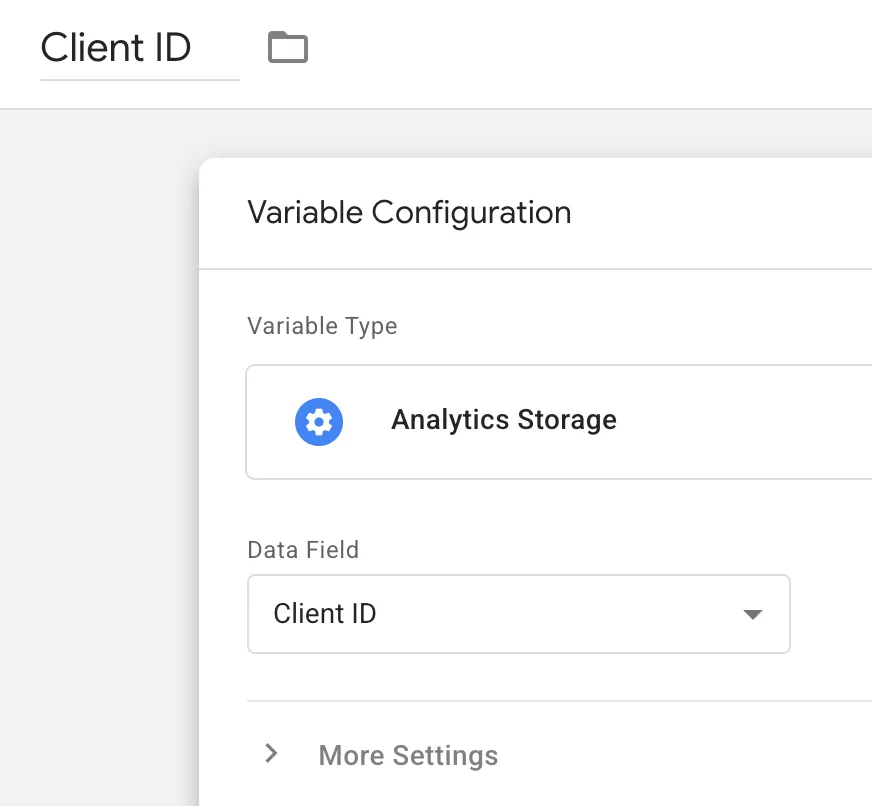
Step 2 : Create an Event Settings Variable
Now that you have the Client ID in a GTM variable, you need to pass it to GA4. You do this through a User Property — which is GA4’s term for a user-scoped parameter attached to every event.
The cleanest way to do this is through a Google Tag: Event Settings variable. If you already use one for your common event parameters (and I highly recommend you do), you’ll just add one more entry.
Here’s the setup:
In GTM,click「Variables」——「New」——「Choose a variable type to begin setup…」——「Google Tag: Event Settings」,name it “Common Event Parameter”, and configure as follows: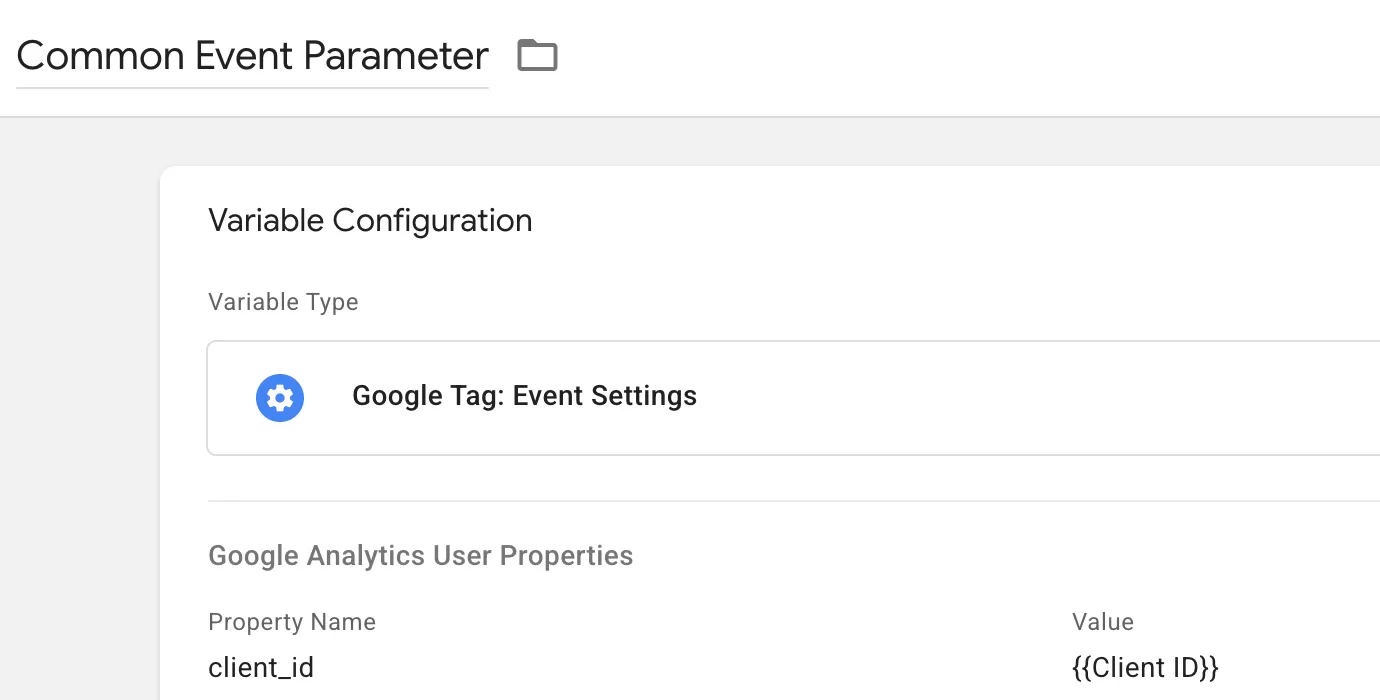
Step 3 : Apply It to Your GA4 Tag
Go back to your GA4 configuration tag. In the tag configuration, set the Event Settings Variable field to
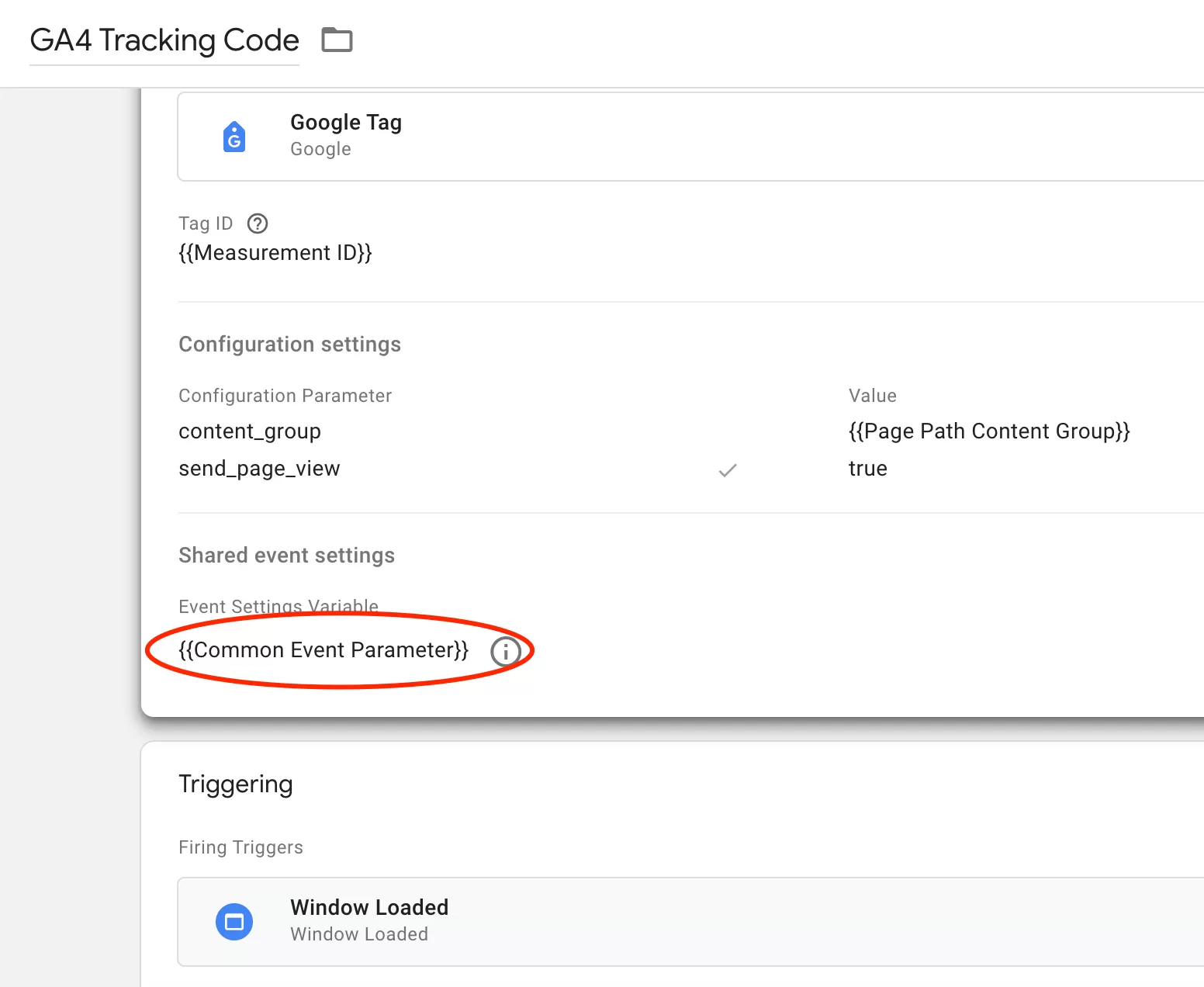
This ensures that the hashed Client ID is sent as a user-scoped parameter on every event.
Step 3 : Preview and Release
Finally, preview testing and release: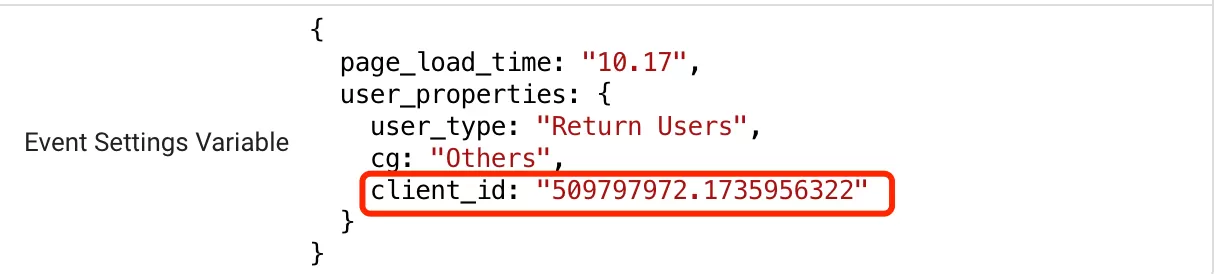
The test is as expected and can be released and data collected.
Step 4 : Register the Custom Dimension in GA4
This is the step most people forget. Sending the User Property from GTM is only half the work. GA4 won’t surface it in reports until you register it as a custom dimension.
In GA4,click「Admin」——「Custom definitions」——「Create custom dimension」, then do the following configuration:
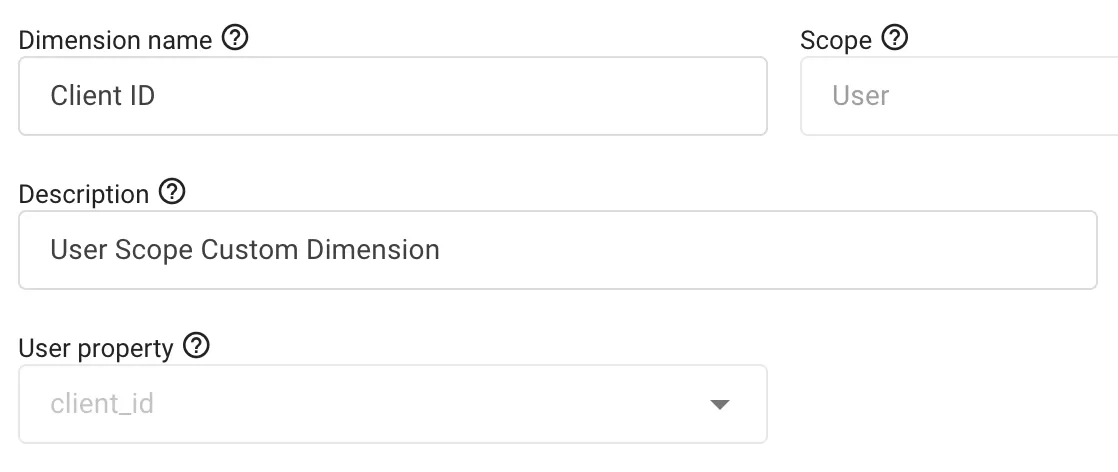
That’s it. GA4 will now start collecting this dimension. A quick heads-up: it can take up to 24 hours for the dimension to appear in reports, and it won’t apply retroactively. Only new events after registration will carry the Client ID.
Step 5 : Verify Data in GA4 Report
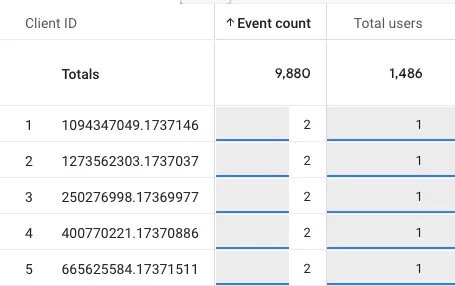
After 24 hours (GA4 needs some time to process), you should be able to see the Client ID in your reports.
In GA4, click 「Explore」 – 「Free form」,configure the following:
- ROWS: Client ID
- VALUES: Event count,Toatl users
Final Words
The GA4 Client ID seems simple at first — a random number in a cookie. Until you realize it has two completely different lives depending on your tracking architecture. Client-side, it’s a readable JavaScript cookie with a straightforward format. Server-side, it’s an HttpOnly string that looks like encrypted gibberish and stays completely out of reach of your browser.
Understanding this difference is essential when debugging GA4 tracking, implementing server-side tagging, or analyzing user behavior.