Updated: April 21, 2026
If you’ve ever opened Google Analytics 4 (GA4) DebugView and felt like your events are “multiplying themselves,” you’re not alone. Seeing repeated events is one of the most common confusion points when debugging GA4 implementations.
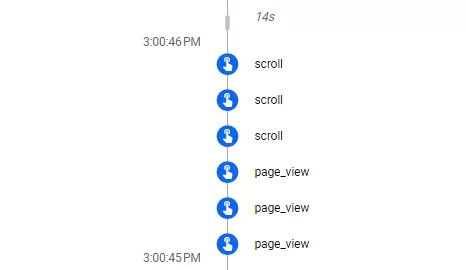
The good news: in most cases, it’s not actual data duplication in your reports. It’s usually a combination of how GA4 processes events, how tagging is implemented, and how DebugView itself visualizes data.
Let’s break it down.
Double Tagging (Most Common Cause)
One of the biggest reasons for repeated events is duplicate implementation.
Typical scenarios:
- GA4 tag installed in both gtag.js and Google Tag Manager (GTM)
- Same event triggered via: automatic events、GTM custom event tags、manual dataLayer pushes
Example: Page view fires from GA4 config tag,then again from a custom GTM event
Result : 2 page_view events in DebugView
Tag Firing Multiple Times in GTM
In Google Tag Manager, misconfigured triggers are a frequent culprit.
Common mistakes:
- Trigger set to “All Pages” + custom event also firing on page load
- DOM Ready + Page View both triggering the same tag
- Multiple tags listening to the same event name
This leads to the same GA4 event being sent multiple times per interaction.
SPA (Single Page App) Route Changes
In SPA frameworks like React, Vue, or Angular:Page reloads do NOT happen and Developers manually send virtual page_view events
If not carefully controlled, you may see:
- Multiple page_view events per route change
- Duplicate sends from router + GTM listener
This is especially common in: Enhanced measurement + custom tracking both enabled
Enhanced Measurement Overlap
GA4’s Enhanced Measurement automatically tracks events like:
- page_view
- scroll
- outbound_click
- file_download
If you manually implement the same events, you may accidentally duplicate tracking.
Browser Refresh and Debug Mode Behavior
When using:GA4 Debug Mode、Tag Assistant or Chrome extensions
You may see:
- Event replays
- Retried hits
- Duplicate debug signals
This is because DebugView prioritizes visibility over deduplication.
Server-Side + Client-Side Duplication
If you are using: Server-side GTM and client-side GA4 tagging
Without proper deduplication: The same event may be sent twice ,Once from browser ,Once from server
GA4 treats them as separate events.
Consent Mode / Retry Behavior
When consent is delayed or partial:
- Tags may queue events
- Then resend after consent update
This can also create repeated-looking events in DebugView.
Final Thoughts
Repeated events in GA4 DebugView are usually not a data problem — they are a diagnostic signal of implementation overlap.
In most cases, the root cause falls into one of three categories:
- Duplicate tagging
- Overlapping triggers
- Mixed tracking methods (client + server + enhanced measurement)
Once you clean up the implementation logic, DebugView will become much calmer — and your data far more trustworthy.