Update time: June 13, 2025
Here’s a scenario I’ve heard more than once. Your website targets Germany. Your content is in German. Your marketing is focused on the German market. But when you open your GA4 location report, you see users from the United States, the Middle East, and other random places. And some of them even converted.
At first glance, it makes no sense. What are all these people doing on a German site? And why are they converting?
If you’ve found yourself in this situation, check one thing before you do anything else: which browser are those users coming from? In my experience, the answer is almost always Safari.
That’s where Apple’s Private Relay comes in — and why your geographic data is suddenly unreliable.
What Is Apple Private Relay?
Apple introduced Private Relay in 2021 as part of its iCloud+ subscription. It’s a privacy feature built into Safari that works similarly to a VPN — but it’s not exactly one.
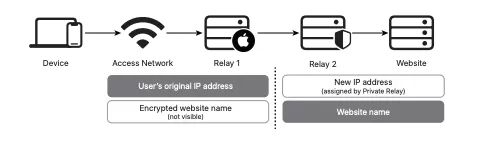
When Private Relay is enabled, all of a user’s Safari traffic is encrypted and routed through two separate relays. The first relay assigns the user an anonymous IP address. The second relay decrypts the request and forwards it to the destination. The key detail is that neither relay ever has the full picture of who the user is and where they’re going.
This is great for user privacy. It’s terrible for analytics.
Because of national regulations, Apple has noted that Private Relay is not available in certain countries, including China, Belarus, Colombia, Egypt, Kazakhstan, Saudi Arabia, South Africa, Turkmenistan, Uganda, and the Philippines.
Why It Breaks GA4 Location Data
GA4 determines a user’s geographic location by looking up their IP address in a third-party database. That IP gets matched to a city, region, and country.
Private Relay breaks this completely. The IP address that GA4 sees is not the user’s real IP — it’s an anonymous IP assigned by Apple’s relay, which could be anywhere. That’s why you see users from the United States or the Middle East visiting a German-targeted website. Their real location is Germany, but GA4 sees the relay’s location instead.
There’s no data corruption here. No bug in GA4. The data is technically correct — it’s just that the IP address GA4 received is not the user’s actual IP.
Is There a Solution?
Here’s the honest answer: there isn’t one.
Since Private Relay operates at the system level — built into Safari and iCloud — there’s nothing a website owner can do to override it. You can’t block it, you can’t detect it reliably, and you certainly can’t bypass it. The user chose to enable Private Relay, and that choice is invisible to your tracking setup.
So a Safari user has Private Relay enabled, the geographic information GA4 captures will simply be wrong.
Wrong Geographic Data in GA4: Final Words
Hopefully, this article sheds at least some light on it. If you see users in strange locations and they’re all on Safari, Private Relay is almost certainly the reason. Your data isn’t broken — it’s just being routed through Apple’s privacy infrastructure.