If you use Google Signals in GA4, you may have noticed changes in how Google handles advertising-related data and user privacy.
Google Signals has always been one of those GA4 features that many marketers enable without much consideration. It can improve reporting capabilities, support remarketing, and provide additional insights about users across devices.
However, as privacy regulations and consent requirements continue to evolve, Google has placed more emphasis on consent-based measurement. In 2026, understanding the difference between Google Signals, Consent Mode, and other GA4 data collection features has become increasingly important.
If you use GA4 audiences for Google Ads campaigns, this is something you should understand.
What Is Google Signals?
Google Signals becomes available when three conditions are met:
- The user is signed in to their Google account.
- The user has enabled Ads Personalization.
- Google Signals data collection is enabled in your GA4 property.
When these conditions are satisfied, GA4 can use aggregated and privacy-protected signals from these users to enrich reporting.
In simple terms: it takes data from Google’s ecosystem — people signed into Chrome, YouTube, Android, etc. — and uses it to fill in the gaps that your first-party data alone can’t cover.
How Does Google Signals Work?
When three conditions are met — user signed in, Ads Personalization enabled, Google Signals enabled in GA4 — GA4 can use aggregated, privacy-protected data from these signed-in users to enrich your reports.
Important: Google Signals does not give you access to PII or raw user-level data. Everything is aggregated and privacy-protected.
What Does Google Signals Provide?
After enabling Google Signals, GA4 can provide several additional capabilities.
- Cross-device reporting — Google Signals allows GA4 to provide cross-device insights without requiring you to implement User ID.
- Remarketing — GA4 audiences to Google Ads and YouTube Ads
- Advertising reports — attribution and conversion analysis
- Demographics and interests — age, gender, interests (without Signals, these are almost always empty)
What Changed for Google Signals in 2026?
Google Signals is no longer the main framework for advertising data control
Starting June 15, 2026, Google is moving advertising data controls from Google Signals into the Consent Mode framework.
- Old way: Google Signals controlled both analytics and advertising. Simple toggle.
- New way: Advertising relies on Consent Mode. You need
ad_storageandad_personalizationconfigured.
Here’s the catch: Some of these changes are still rolling out. You might not see the full impact immediately, but Google is gradually migrating everything away from Google Signals.
Both systems can coexist for now. If you’re running Google Ads campaigns using GA4 audiences, start planning your Consent Mode implementation. If you only use Google Signals for demographics reports, you’re fine.
What Google Signals Is Still Good For
Under the new model, its primary value is demographic and interest reports. That’s pretty much it. If you disable it, those reports will be empty.
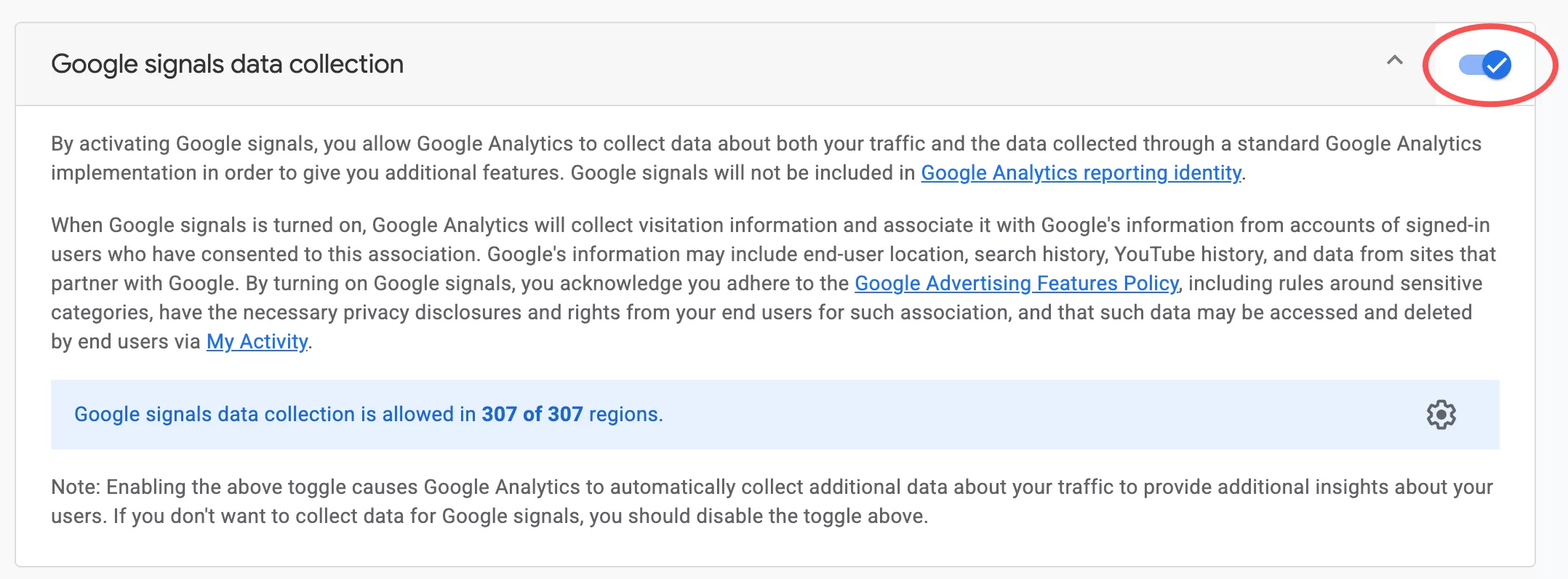
How to Check If Google Signals Is Enabled
In GA4,click「Admin 」——「Property Settings 」——「Data Collection」,toggle「Google Signals data collection」:
Final Words
Google Signals used to be the central switch for both analytics and advertising in GA4. In 2026, that changed. Advertising now depends on Consent Mode, and Google Signals is mostly limited to demographic reporting.