Update time: June 16, 2025
You’re looking at a GA4 report. Pageviews look fine. Events are firing. Sessions seem reasonable. But the Users metric shows zero. Nothing. Nada.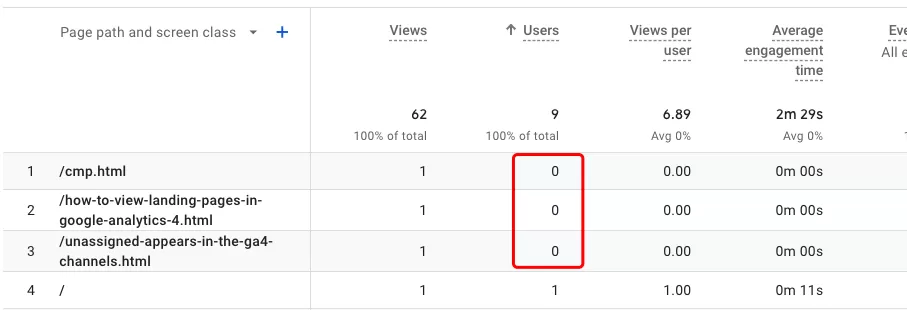
If you’ve been there, you know how confusing it is. Data everywhere except the one number that matters most. Don’t worry — your tracking probably isn’t broken. There are a few common reasons this happens, and they’re all easy to diagnose.
Reason #1: Users in GA4 Means Active Users
This one trips up a lot of people. In GA4, the Users metric is actually Active Users by default. That’s not the same thing as “everyone who visited your site.”
GA4 defines an active user as someone who had an engaged session — meaning a session that lasted longer than 10 seconds, had a conversion event, or had at least 2 pageviews. If someone lands on your site and bounces immediately, they won’t count as an active user.
So if you see Engaged sessions = 0, that’s your sign. No engaged sessions means zero active users, which means Users shows as 0, even though you had traffic.
The fix: Check your Engaged sessions metric alongside Users. If both are zero, your visitors are bouncing — not a tracking issue, but a content or user experience one.
Reason #2: Data Thresholds
GA4 applies data thresholds to protect user privacy. When the data in your report is too small (especially for smaller properties), GA4 may suppress the values to prevent anyone from reverse-identifying individual users.
When a threshold is applied, you’ll see a subtle indicator — the data quality icon changes color next to the metric. Hover over it, and GA4 will tell you that a threshold is active.
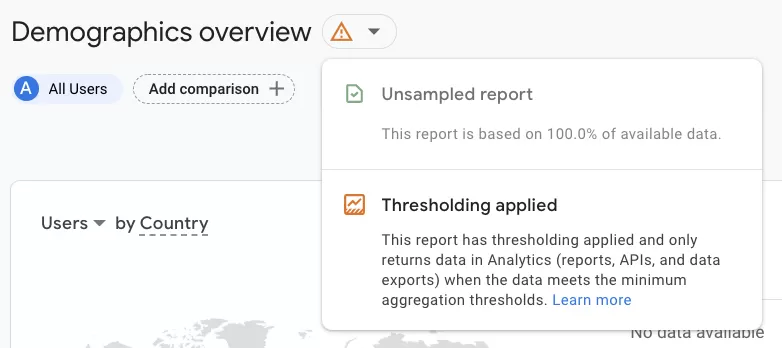
The fix: Look for the color change on the data quality indicator. If you see it, that’s the threshold at work. There’s no way to disable it, but it only kicks in for small data sets. As your traffic grows, the threshold will naturally stop applying.
Reason #3: Data Hasn’t Been Processed Yet
If you’re looking at today’s data, Users might show 0 simply because GA4 hasn’t finished processing it yet. GA4 doesn’t give you real-time data in standard reports — there’s always a processing delay.
The fix: Check yesterday’s or last week’s date range. If Users shows normal numbers for past dates but zero for today, you just need to wait. Come back in a few hours and the data should populate.
Final Words
A zero Users count in GA4 is jarring, but it’s almost never a sign that something is fundamentally broken. More often than not, it’s one of these three things: you’re looking at Active Users and nobody engaged, a data threshold is hiding small numbers, or the data simply hasn’t processed yet.