Update time: April 23, 2026
You’re looking at your GA4 dashboard and something doesn’t add up. New Users is 2914. Total Users is 2221.
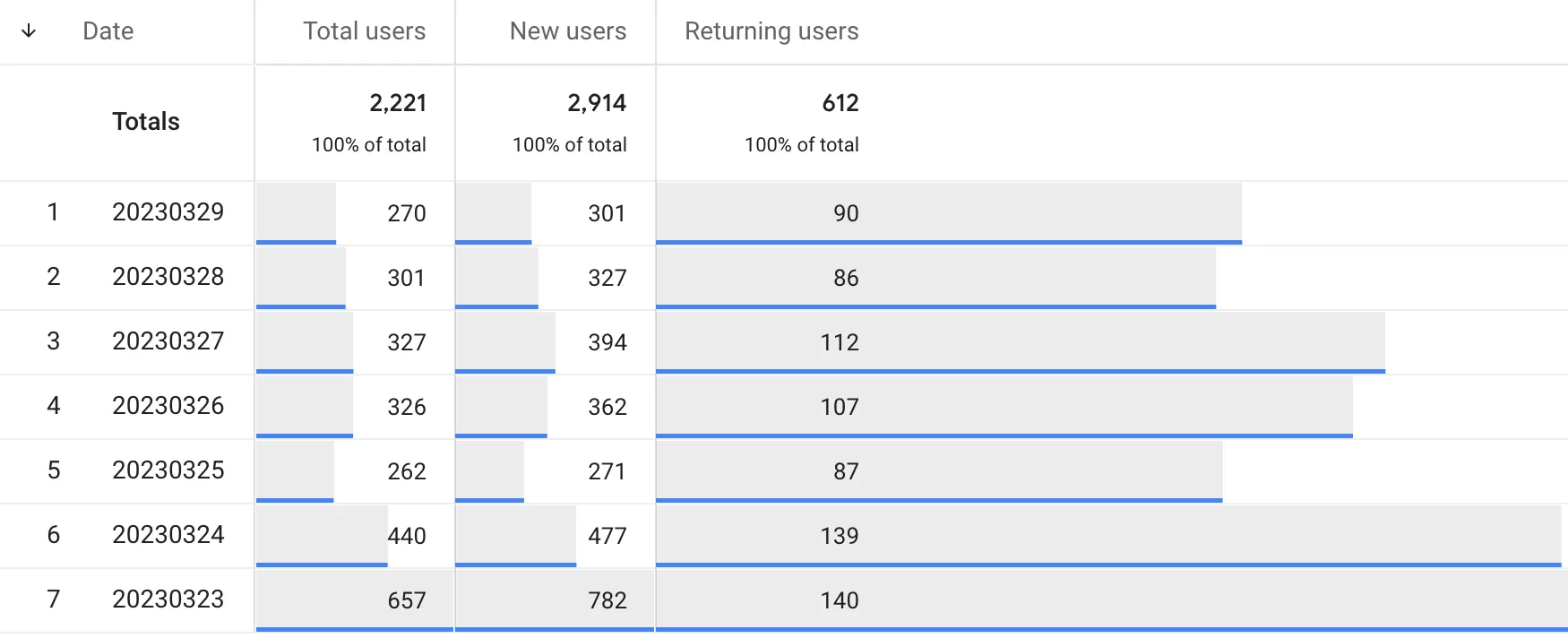
Your first thought is probably that something is broken. How can there be more new users than total users? That’s like saying there are more children than people in a room.
Don’t panic — your data isn’t broken. This is one of those GA4 quirks that looks like a bug but is actually just the result of how these two metrics are calculated differently.
Why New Users Can Exceed Total Users
The key to understanding this is that New Users and Total Users are not measuring the same thing.
- New Users is counted based on events — specifically, how many
first_visit(web) orfirst_open(app) events fired within the selected time range. - Total Users is counted based on unique identifiers — Client ID or User ID — depending on your Reporting Identity settings.
New Users counts events. Total Users counts people. Once you understand that distinction, the whole thing starts to make sense.
Scenario 1: Duplicate First Visit Events
A single user can trigger multiple first_visit events. This happens more often than you’d think — for example, when a user clears their cookies, visits from a different browser, or uses private browsing mode. Each time GA4 sees what looks like a new device, it fires a new first_visit event.
Since New Users counts events, not unique devices, those duplicates inflate the number. Meanwhile, Total Users might still count that person as one user (especially if they logged in with a User ID across sessions).
Scenario 2: Identity Merging with Blended or Observed Identity
This is the more interesting case.
When you use Blended or Observed as your Reporting Identity, GA4 tries to merge users across devices using signals like User ID or Google signals. This can reduce the Total Users count — because two devices used by the same person get merged into one user — while leaving New Users unchanged, because both devices fired their own first_visit event.
Let me walk you through a real scenario I’ve seen play out:
- Morning: A user visits your site on their laptop (Device A). GA4 fires a
first_visitevent. The user logs in, so their User ID is now associated with that device. - Afternoon: The same user visits your site on their phone (Device B). GA4 fires another
first_visitevent — because Device B has never visited before. The user logs in again.
With Blended or Observed identity, GA4 recognizes that both visits came from the same User ID and merges them. So Total Users = 1. But New Users = 2 — because two first_visit events were fired.
That’s how you end up with 200% new users. It’s not a bug — it’s identity resolution working as designed.
What You Can Do About It
There’s no magic fix here, but understanding the cause helps you interpret the numbers correctly.
- For duplicate
first_visitevents: There is currently no reliable way to fully eliminate them. This is a known limitation of event-based counting. If a user clears cookies or visits from a new browser, GA4 will fire anotherfirst_visit. That’s just how it works. - For identity merging: If you want to avoid the cross-device merging that causes this discrepancy, you can switch your Reporting Identity to Device-based. This will prevent GA4 from merging users across devices — but it will also reduce the accuracy of your user counts in the other direction, since the same person on two devices will count as two users.
New Users Higher Than Total Users: Final Words
Long story short: New Users measures events, while Total Users measures people (based on identity logic). They’re calculated differently, so they can diverge in ways that look wrong at first glance.
This is not a bug you need to report to Google. It’s just one of those GA4 nuances that becomes obvious once you know how the metrics work under the hood.