Update time: May 24, 2024
If you logged into your GA4 property recently and saw a yellow warning banner at the top saying your Google Tag code isn’t configured correctly, you probably had a moment of panic. I know I did the first time I saw it.

“Your Google Tag code isn’t configured correctly, which may soon prevent your property from measuring automatic events. To fix this, place your Google Tag configuration code in the correct location on all pages that measure events.”
The thing is, in most cases, your tracking is working just fine. So what’s going on?
What Causes This Warning?
Based on feedback from Google support, this warning appears to be linked to a newly introduced feature in Google Tag Manager that GA4’s detection logic doesn’t properly recognize.
Here’s what I think is happening: Google rolled out some changes on the GTM side, and GA4’s built-in check for the Google Tag configuration is flagging setups that don’t match its updated expectations. The result is a false positive — GA4 thinks the tag is missing or improperly installed, even though everything is working as it should.
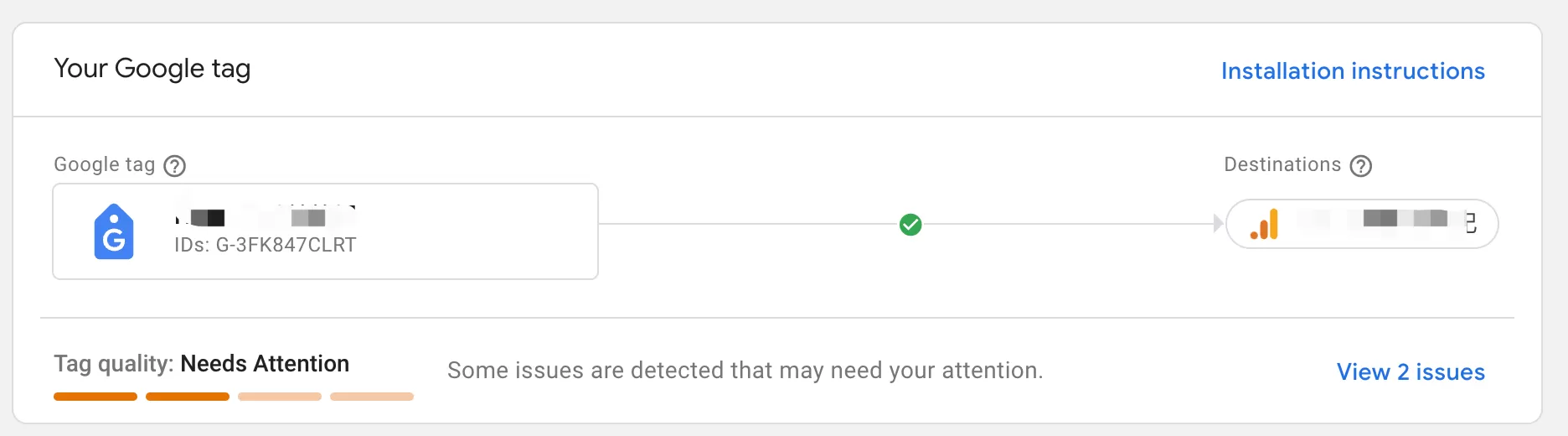
You might notice related updates in both Google Tag Manager and the Google Tag settings inside GA4. It’s all connected to the same underlying change.
Google Tag Manager (GTM):

The Google Tag settings inside GA4:
The Good News: You Can (Probably) Ignore It
At the moment, this seems to be a false warning triggered by Google’s detection logic. If your events are firing, your conversions are tracking, and your data looks normal in reports, your setup is almost certainly fine.
Don’t get me wrong — I’m not saying you should never check your GA4 configuration. But in this specific case, the banner is more noise than signal. You can safely ignore the message and wait for Google to roll out an official fix.
Final Words
This is one of those situations where Google’s systems aren’t quite keeping up with themselves. A new feature in GTM triggers a warning in GA4, and in the meantime, website owners are left wondering if their analytics is broken.