Update time: April 13, 2026
What Is (not set) in GA4?
(not set) is a placeholder value. When GA4 expects a dimension value but doesn’t receive one, it fills the gap with “(not set)”. Think of it as an empty cell in a spreadsheet — GA4 knows the column exists, but there’s nothing in it.
The definition is simple. The hard part is figuring out why the value is missing, because the reason changes depending on which dimension you’re looking at.
Landing Page
If your Landing Page report is full of (not set), the root cause is almost always a missing page_view event within the session.
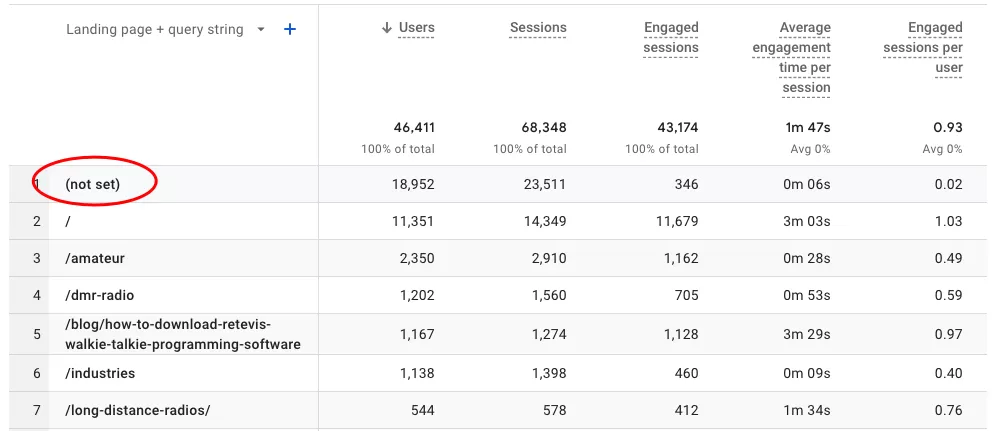
Here’s a real scenario I’ve seen many times:
- A user visits your site. GA4 records a session with a landing page.
- The session times out.
- The user returns and triggers an event — a scroll, a click, something.
- But no new page_view event fires at the start of this new session.
Since GA4 never received a pageview for that new session, it can’t determine the landing page. So you get (not set).
Page Location
This one has a hard technical limit.
The Page Location dimension can only store 1000 bytes. If your URL is longer than that — and with all the UTM parameters, campaign IDs, and tracking tags some URLs carry, that can happen — GA4 truncates it and shows (not set) instead.
The fix isn’t complicated: shorten your URLs. If you have long tracking parameters, consider using a URL shortener or moving parameters server-side.
Page Title
There are two things that can cause (not set) in Page Title:
- Missing
<title>tag — Check your page source. If there’s no<title>tag in the<head>, GA4 has nothing to read. Add one. - GA4 fires before the title loads — This is rare, but it can happen on pages where the title is injected dynamically via JavaScript after the page loads. If the
page_viewevent fires before the title becomes available, the dimension value is (not set).
Content Group
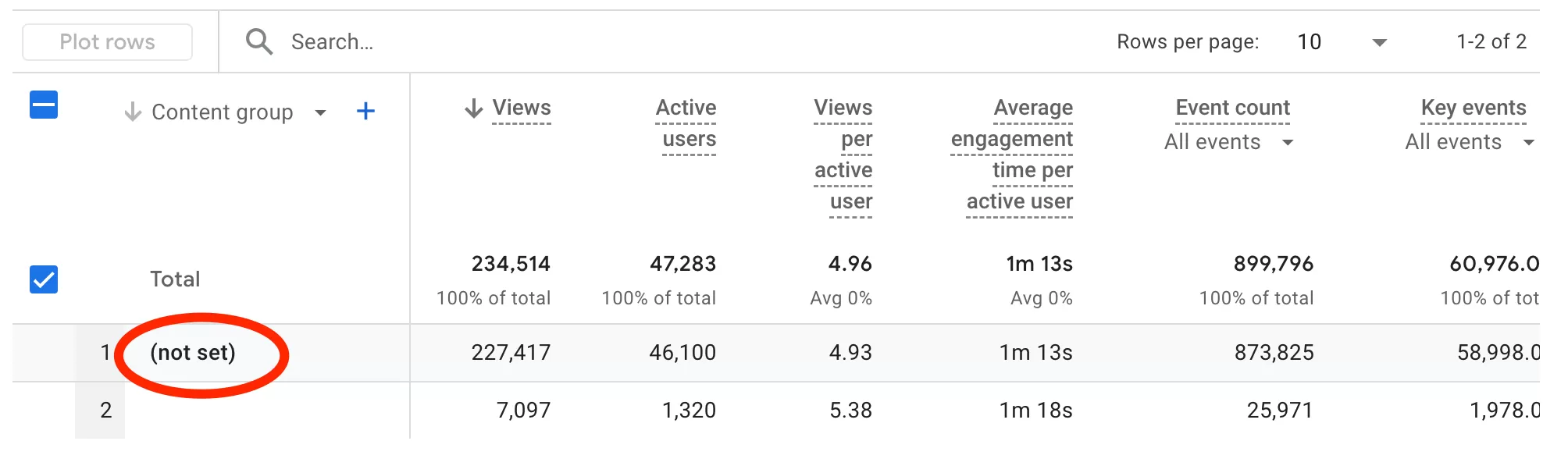
Content Group in GA4 is a reserved dimension — it exists, but it’s empty until you configure it. If you see (not set) here, it simply means you haven’t set up any content groups yet.
Session Source/Medium
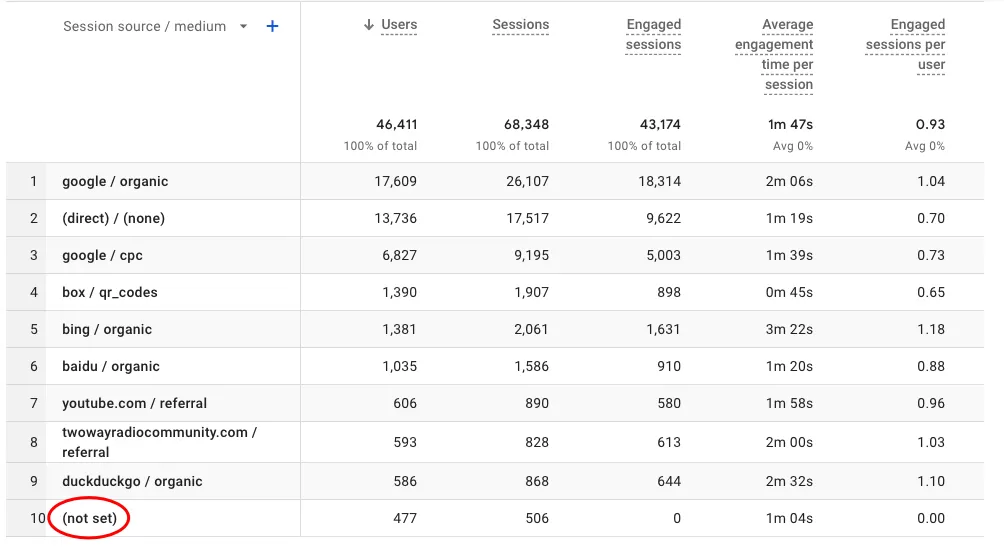
This is one of the most common places to see (not set), and there are three distinct causes.
- Missing
session_startevents.When a session starts, GA4 fires a session_start event that carries page_location and page_referrer. Source/Medium is derived from these parameters. The problem is that some sessions have multiple session_start events, and some have none at all. When session_start is missing or doesn’t carry accurate data, Source/Medium defaults to (not set). - Measurement Protocol without
session_id.If you’re sending data via the Measurement Protocol and your payload doesn’t include a session_id parameter, GA4 can’t associate the data with a source or medium. - Missing UTM parameters. If a user visits your site without UTM parameters on the URL, GA4 may fall back to the referrer — but if there’s no referrer either, Source/Medium ends up as (not set).
Geographic Location
If City or Country shows (not set), here’s what’s likely happening:
- Third-party data lookup fails. GA4 determines location by querying a third-party IP database. If the IP can’t be resolved — for example, it belongs to a data center, a VPN, or a private network — the lookup returns nothing.
- Server-Side Tagging strips the IP. This is by design. When you use server-side tagging, the user’s IP is removed from the request. Without an IP, GA4 has no way to determine geographic location.
- Measurement Protocol has no IP. Data sent via the Measurement Protocol doesn’t include an IP address by default, which means no geographic data.
Transaction ID
This one’s a bug, and it’s been around for a while.
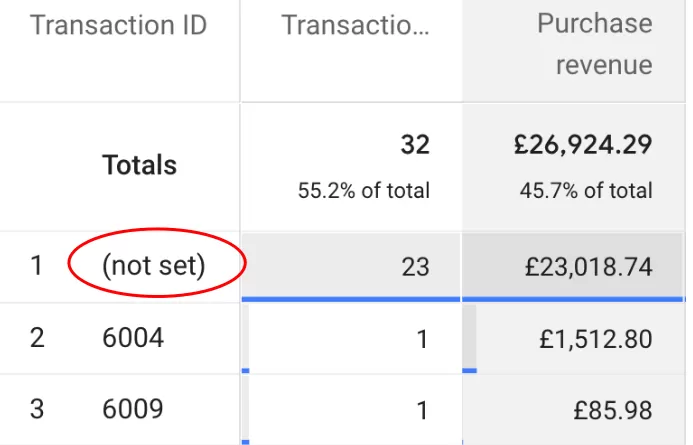
If your transaction IDs are purely numeric — something like 123456 or 2026041301 — GA4 may fail to register them and show (not set) instead.
I haven’t seen Google confirm a permanent fix for this. The workaround is straightforward: use a mix of letters and numbers. Instead of 123456, use ORD-123456 or TXN-A1B2C3.
New / established
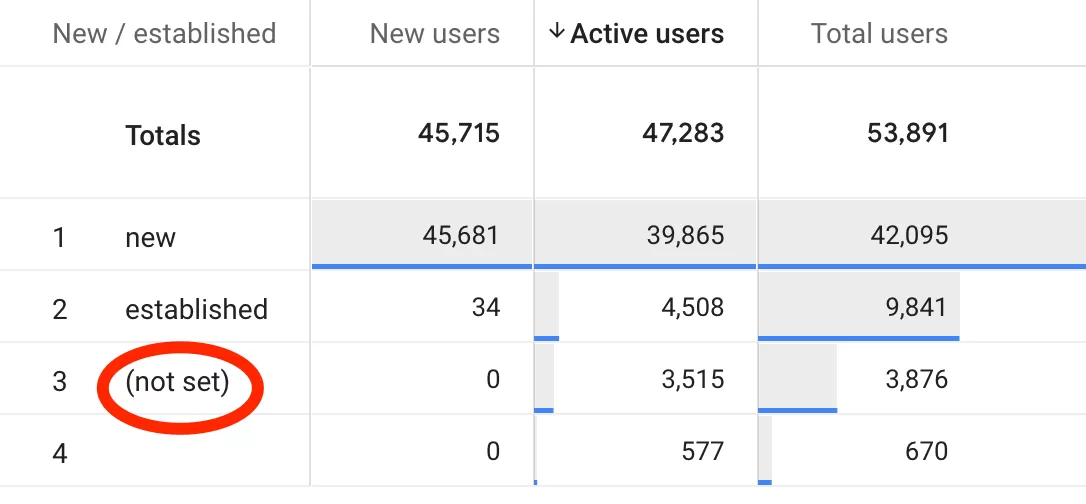
This one trips up a lot of people, so let me explain it carefully.
A4 classifies users into three buckets: New, Established, and (not set). The logic goes like this:
- If a user fires first_open or first_visit within the selected date range, they’re classified as New.
- If a user has fired first_open or first_visitbefore the selected date range, they’re classified as Established.
- If neither condition is met — meaning GA4 has no record of first_open or first_visit for that user within or before the range — they fall into (not set).
This usually happens for users who visited outside the selected date range but never fired a first_open or first_visit event at all. It’s more common than you’d think.
Item Promotions name
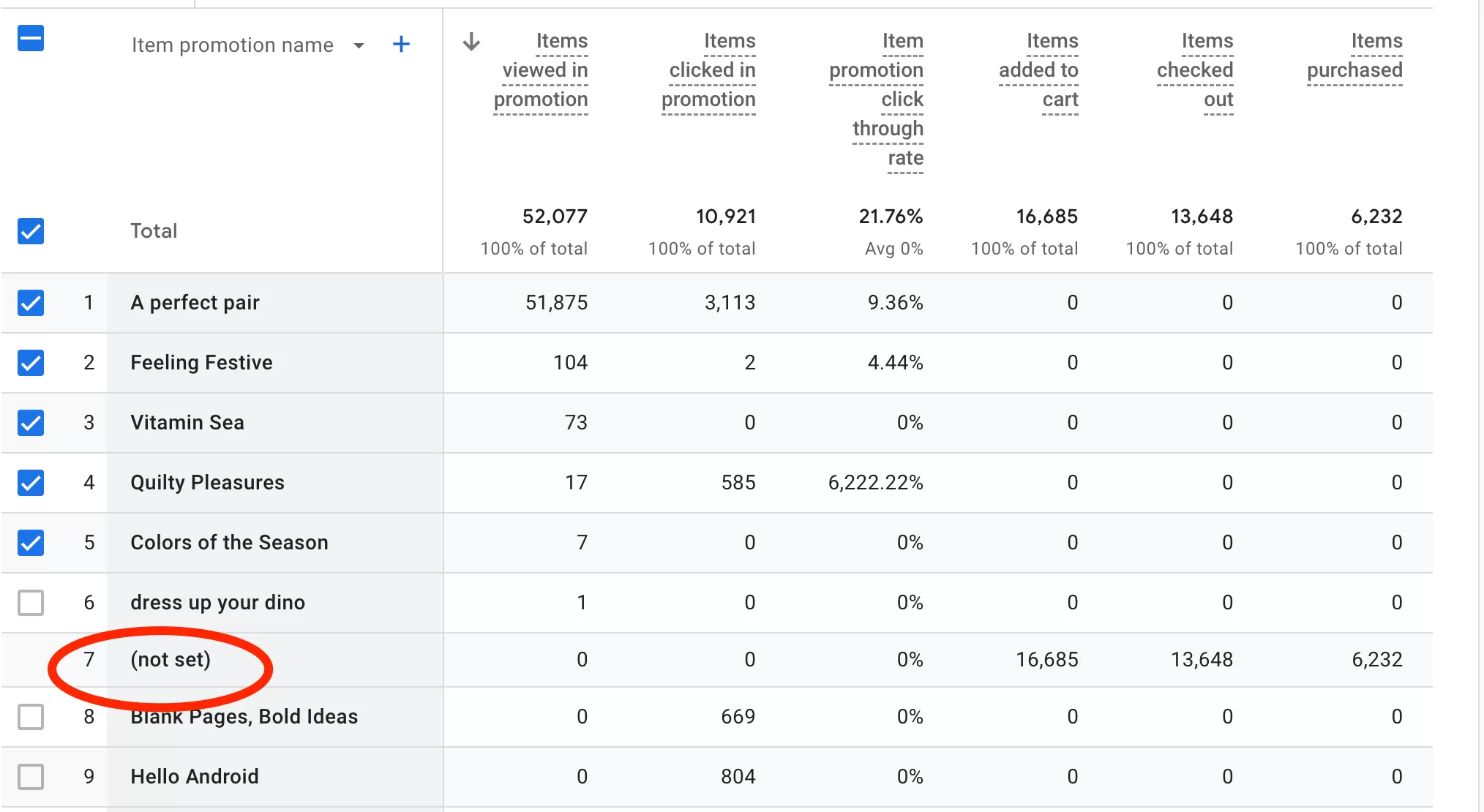
The Promotions report in GA4 is designed to show how each promotion drives purchases and revenue. But there’s a known limitation: GA4 doesn’t yet support on-site attribution for promotions. Events like Add to Cart, Checkout, and Purchase that are tied to promotions get lumped into (not set) because GA4 can’t connect them back to the specific promotion that triggered them.
Custom Dimensions
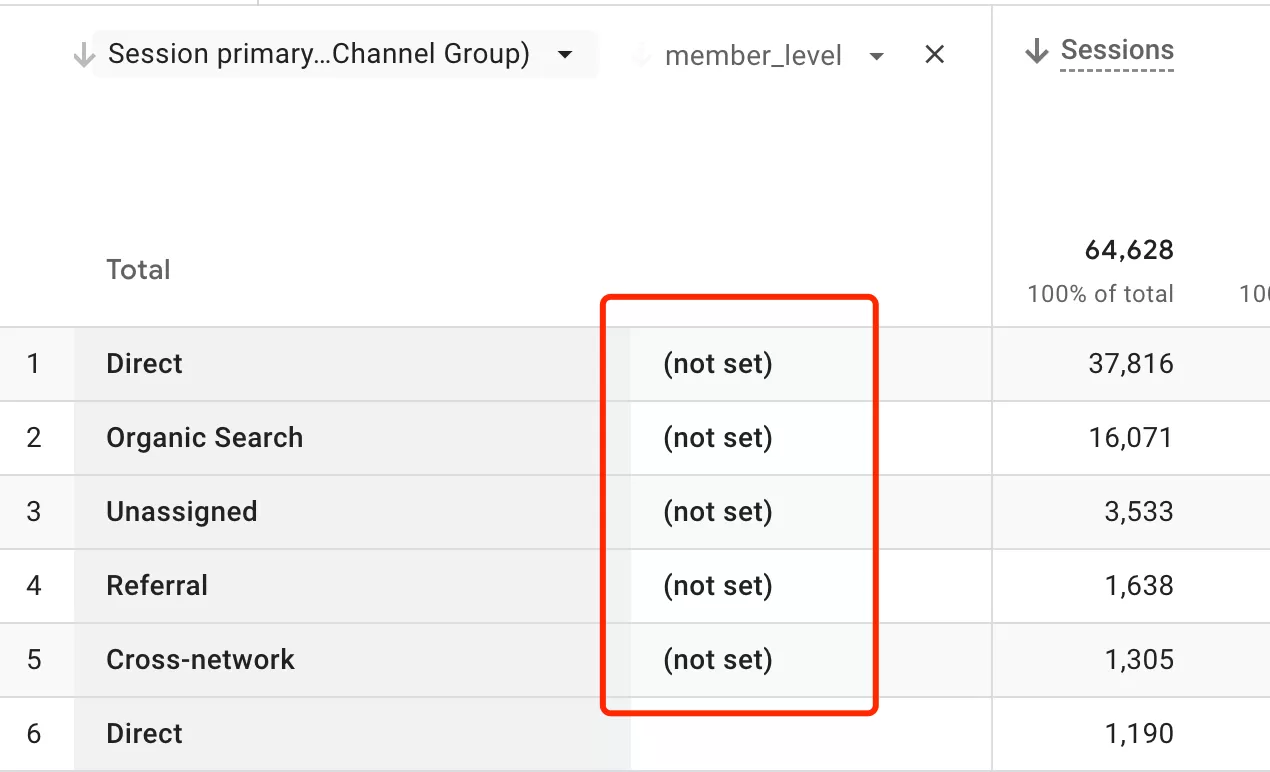
If a custom dimension — say, member_level or user_type — shows (not set), the cause is almost always the same: the value was never sent to GA4. Check your event payload and make sure the parameter is being passed in the right events.
Google Ads
If (not set) is showing up in your Advertising reports, there are four things to check:
- Google Ads account not linked. Go to Admin → Google Ads Linking and verify the connection.Auto-tagging is off. Without auto-tagging, GA4 can’t match clicks to conversions. Enable it in your Google Ads account settings.Traffic from unlinked accounts. If someone else is running Google Ads campaigns to your site from an account you haven’t linked, GA4 can’t attribute those conversions — they show as (not set).Incorrect manual tagging. If you’re manually tagging your destination URLs with UTM parameters and you miss a parameter or use an incorrect value, GA4 won’t recognize the traffic source.
(not set) in GA4: Final Words
I believe this article is far from complete, and there are more unknowns that our community would like to figure out. (not set) shows up in so many places in GA4 that it’s nearly impossible to catalog every scenario in a single post.
But hopefully, this guide gives you a place to start. The key is to identify which dimension is showing (not set) — once you know that, you can trace it back to the specific cause.