Update time: September 5, 2025
If your website uses GA4, Google Ads, Adobe Analytics, Meta Pixel, and other marketing scripts, managing every tag directly in the website code can become difficult.
A tag management system, or TMS, gives your team one place to deploy, test, update, and control these tags.
But which tag management system should you choose?
The answer depends less on the number of integrations and more on your implementation complexity, data governance, privacy requirements, and existing analytics platform.
What Is a Tag Management System?
A tag management system lets you manage tracking and marketing tags without editing the website code for every change.
A tag can be:
- An analytics script
- An advertising pixel
- A conversion tag
- A remarketing script
- A custom JavaScript integration
Instead of adding every script directly to the website, developers install a TMS container. The team then controls which tags load, when they fire, and what data they receive.
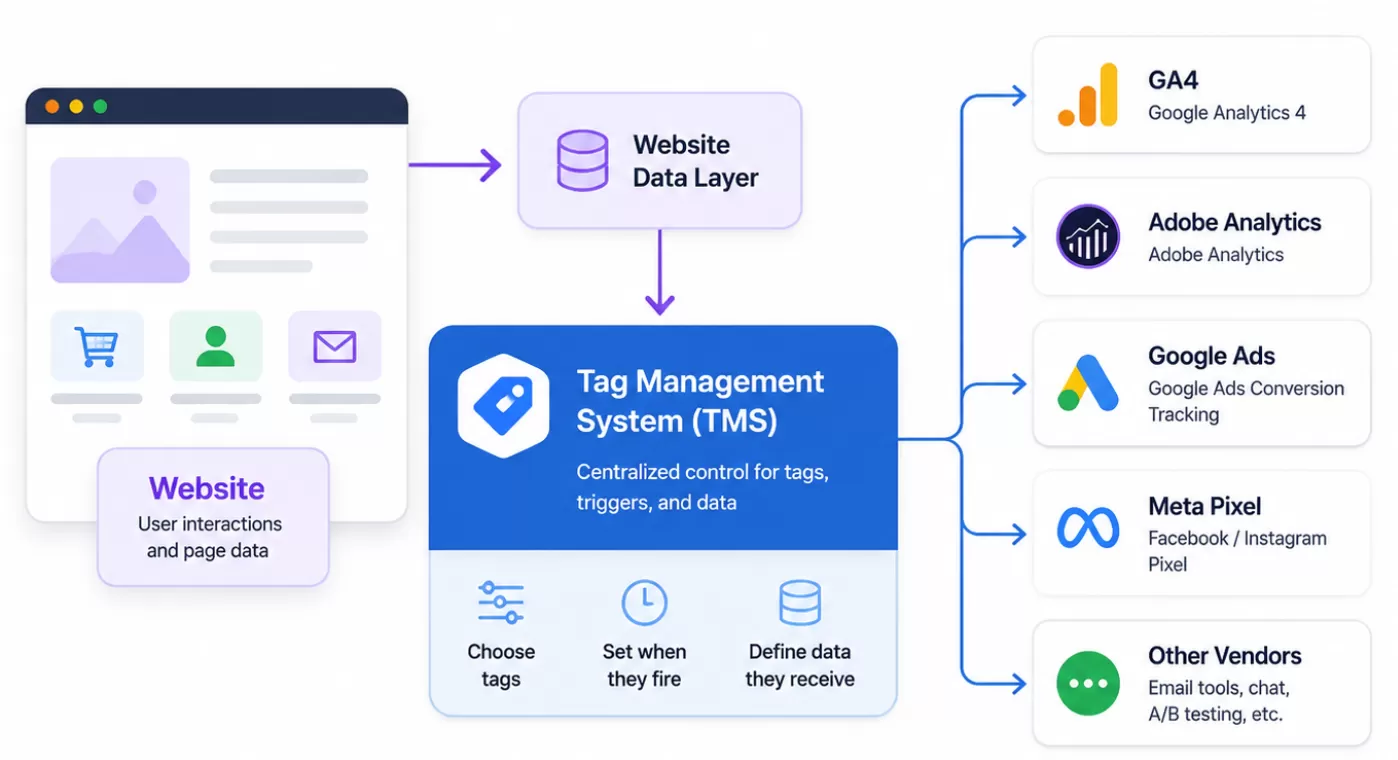
A TMS improves deployment speed, but it does not replace a measurement strategy. You still need a reliable data layer, consistent event names, consent rules, testing, and publishing controls.
Google Tag Manager

Google Tag Manager is the most accessible tag management software in this comparison. The standard version is free and integrates naturally with GA4, Google Ads, and other Google products.
It also supports third-party tags through templates, custom HTML, and custom JavaScript. For example, an ecommerce team can use one purchase event in the data layer to trigger GA4, Google Ads, and affiliate tags.
GTM is a good choice when you want:
- A free tag management system
- Quick deployment
- Flexible triggers and variables
- Preview and debugging tools
- A large community and documentation ecosystem
Its main weakness is governance. Large containers can become difficult to maintain when teams create duplicated tags, unclear triggers, and excessive custom HTML.
For most websites, I would evaluate Google Tag Manager first.
Adobe Launch

Adobe Experience Platform Tags is Adobe’s current tag management solution. Older articles may refer to it as Adobe Launch or Adobe Experience Platform Launch. Adobe Tags uses extensions, data elements, rules, libraries, and publishing environments to manage web and app integrations.
Its strongest advantage is Adobe integration. An Adobe Analytics implementation can use data elements and rules to map ecommerce data to eVars, events, Adobe Target, and other Adobe technologies.
Adobe Experience Platform Tags is a natural choice when:
- Adobe Analytics is your primary analytics platform
- Your organization already uses Adobe Experience Cloud
- You need Adobe-specific extensions
- Multiple teams require controlled development and publishing workflows
If your organization mainly uses GA4 and Google Ads, Adobe Tags may introduce unnecessary platform complexity.
Tealium iQ is designed for organizations that need to standardize data before sending it to many vendors.
For example, an international ecommerce company may define one vendor-neutral purchase object containing the order ID, currency, revenue, products, region, and consent state. Tealium can then map that data to GA4, Adobe Analytics, advertising platforms, and other destinations.
Tealium iQ focuses on:
- Data-layer management
- Vendor mappings
- Load rules
- Multiple environments
- Permissions
- Consent integrations
- Enterprise publishing workflows
This makes it useful for large organizations with complex marketing technology stacks. The trade-off is that it requires more planning than GTM. If you manage only a few tags on one website, Tealium may provide more structure than you need.
Ensighten Manage

Ensighten is primarily relevant to organizations that need strict control over third-party scripts, privacy, security, and enterprise governance. Current Ensighten-related documentation also references CHEQ Control, so confirm the current product name and package before making a purchasing decision.
Commanders Act

Commanders Act is a European marketing technology platform that combines tag management with consent management, data collection, and activation capabilities. It may be worth evaluating when regional privacy rules and consent workflows are central to your implementation.
Which Tag Management System Should You Choose?
- Use Google Tag Manager when you need a flexible and affordable system for GA4, Google Ads, and third-party tags.
- Use Adobe Experience Platform Tags when Adobe Analytics already defines your data collection architecture.
- Use Tealium iQ when your biggest problem is inconsistent data across websites, teams, and vendors.
- Evaluate Ensighten when security and enterprise script governance are more important than ease of adoption.
- Evaluate Commanders Act when your organization needs privacy-centered tag management across European markets.
The best tag management system is not the one with the longest feature list. It is the one your team can understand, test, govern, and maintain.
If your main problem is deploying tags, choose the simplest platform that solves it. If your main problem is controlling data across a large organization, prioritize governance over deployment speed.