If you opened GA4 one morning and saw a massive spike in your Direct traffic channel — and nothing else changed in your marketing campaigns — you probably felt that familiar pit in your stomach. Is the data broken? Is it spam? Did something break in your tracking?
If my guess was correct, you have come to the right place.
A sudden Direct traffic surge is almost never random. It’s almost always one of four things. In this article, I’ll walk through each one, how to identify it, and what to do about it.
#1. Spam / Bot Traffic
This is the most common culprit, and honestly, it’s usually the easiest to confirm.
Spam traffic isn’t real users — it’s bots, crawlers, and automated scripts hitting your site. GA4 does filter known bots by default , but it doesn’t catch everything. Far from it.
How to diagnose it
Add a secondary dimension to your Direct channel report. I usually start with City, then Country, then Device Category. Here’s what you’re looking for:
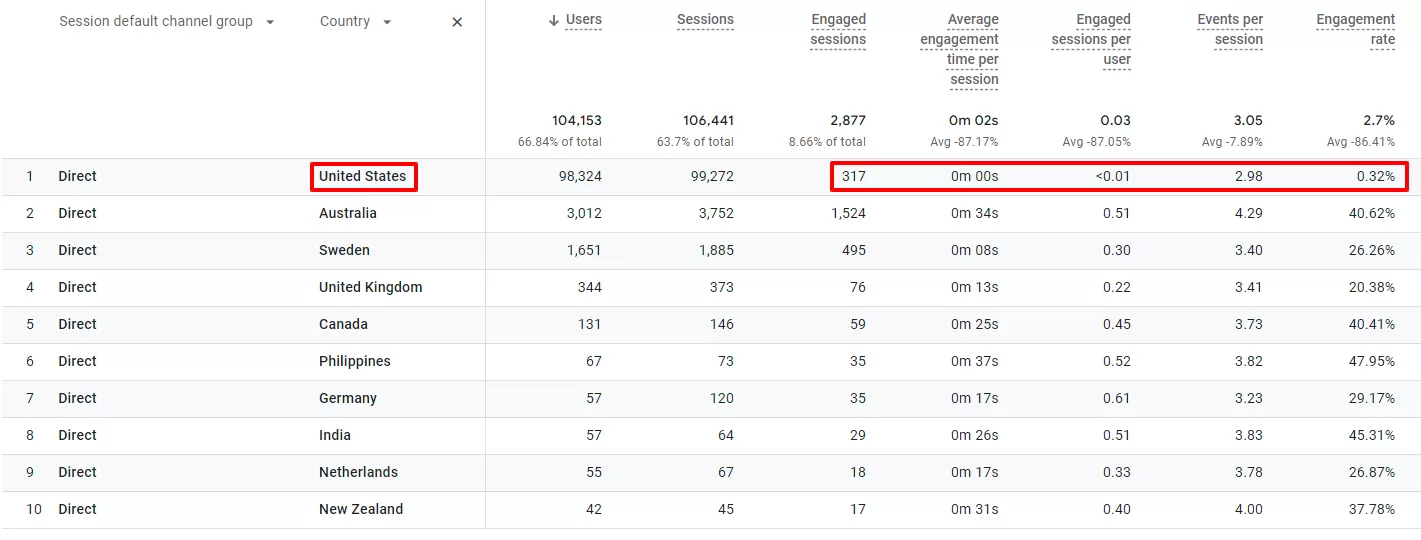
The metrics in the United States are abnormally low, suspiciously low engagement metrics — near-zero average engagement time, 100% bounce rate.
That’s bots.
What to do
You can’t stop bots from hitting your site. But you can filter them out of your reporting
#2. Untagged Campaign Traffic
This one is less about bots and more about human error — specifically, your marketing team’s error. And I say that with love.
Here’s the scenario: You run a campaign — maybe a newsletter send, a social media ad, or a partnership placement. Users click the link and land on your site. If that link doesn’t have UTM parameters, GA4 doesn’t know where the traffic came from. No referral? No UTM? It falls into Direct.
How to diagnose it
Look at the landing pages in your Direct traffic report. If you see pages that are typically used in campaigns (landing pages, promotional pages, product launch pages), that’s a strong signal.
What to do
Work with your marketing team to establish a UTM tagging policy. Use tools like the Google Campaign URL Builder to generate tagged links consistently. For recurring campaigns, set up automated UTM tagging in your email platform or ad manager.
#3. CMP / Consent Misconfiguration
This one is trickier because it doesn’t look like a tracking error at first.
CMP stands for Consent Management Platform (Cookiebot, OneTrust, Quantcast Choice, etc.). If your CMP is misconfigured, here’s what can happen:
The CMP blocks GA4 from firing on the first page load until the user makes a consent choice. But here’s the catch: when GA4 does finally fire (on page 2 or 3 of the user’s session), it creates a new session — and without a referrer or campaign parameter to anchor it, that new session lands in Direct.
How to diagnose it
- Check if a CMP was recently installed or updated on your site.
- Look for a correlation between the Direct traffic surge and a CMP deployment date.
What to do
- Configure your CMP correctly.
#4. Redirects
Here’s the scenario: Someone clicks a link to your site. That link doesn’t go directly to your site. Instead, it passes through a redirect hop.Each hop is a chance for the browser to drop the Referer header. If the referrer gets dropped and there are no UTM parameters on the URL, GA4 has nothing to attribute the traffic to. It falls into Direct.
How to diagnose it
Open Chrome DevTools, enable Preserve log, and paste one of your suspect links into the address bar. If you see multiple 301/302 requests before the final 200, you have a redirect chain. Click the final request and check the Request Headers. No Referer header? That traffic is landing in Direct.
What to do
The best fix is to use UTM parameters. Unlike referrers, they survive redirects because they’re part of the URL. Add UTMs to every external link you control, enable auto-tagging for ad platforms, and ask affiliate platforms to append them where possible.
If UTMs aren’t an option, minimize redirect chains, use server-side 301/302 redirects instead of JavaScript or meta refresh, and keep redirects on HTTPS.
For critical traffic, capture the original referrer on the server and append it as a UTM parameter during the redirect. It requires custom development but is highly reliable.
Direct Traffic Surge in GA4: Final Words
So here’s what I’d recommend as your diagnostic checklist when you see a Direct traffic spike:
- Check for spam — look at cities, devices, engagement time.
- Talk to your marketing team — are campaigns running without UTM tags?
- Review your CMP setup — is GA4 blocked on the first page view?
- Check for redirect chains — use Chrome DevTools with Preserve log to see if referrer headers are getting stripped between the click and the landing page.
In my experience, 80% of Direct traffic surges are caused by reasons #1 or #2. The other 20% require digging deeper.