Updated: December 19, 2025
If you’re using Shopify’s Custom Pixel to send data to Google Analytics 4, you might have noticed something strange in your reports. Instead of clean, readable URLs like /products/blue-shoe, you’re seeing paths that look like this:
/wpm@10e09e41w77fb031apd6c28ceam532d5d9a/custom/web-pixel-118849878@4/sandbox/modern/page-nameIt looks like your URLs got run through a blender. And if you’re trying to analyze which pages are performing well, well, good luck making sense of that.
Don’t panic — your site is fine. This is a known issue with how Shopify Custom Pixel works.
If my guess was correct, you have come to the right place. In this article, I’ll explain why this happens and walk you through a clean fix that takes about 10 minutes to set up.
Why are the URLs garbled?
The culprit is the Sandbox mode that Shopify Custom Pixel runs in.
When you install GA4 via Shopify Custom Pixel, the pixel operates inside a sandboxed environment. The URLs captured in that sandbox are not the real browser URLs — they’re internal sandbox paths that look like machine-generated noise.
So when GA4’s default page tracking fires inside that sandbox, it grabs the sandbox URL, not the actual page URL. And that’s what ends up in your GA4 reports.
The result: your page report is filled with paths like /wpm@10e09e41.../sandbox/modern/page-name instead of actual product or collection URLs.
The fix: disable default tracking and use custom events
The solution is straightforward. You need to:
- Tell GA4 to stop sending the default page_view (because it captures the sandbox URL)
- Use a custom event from Shopify to send the real page URL
- Wire that custom event into GTM so GA4 receives clean data
Let’s walk through it step by step.
Step 1: Disable Default Page Tracking
First, you need to stop GA4 from automatically sending page_view events. If you don’t, the garbled sandbox URLs will keep flowing into your reports.
In GTM, click「Tags」——「New」——「Choose a tag type to begin setup…」——「Google Analytics」——「Google Tag」, name it “Disable Default PageView”, and then make the following settings:
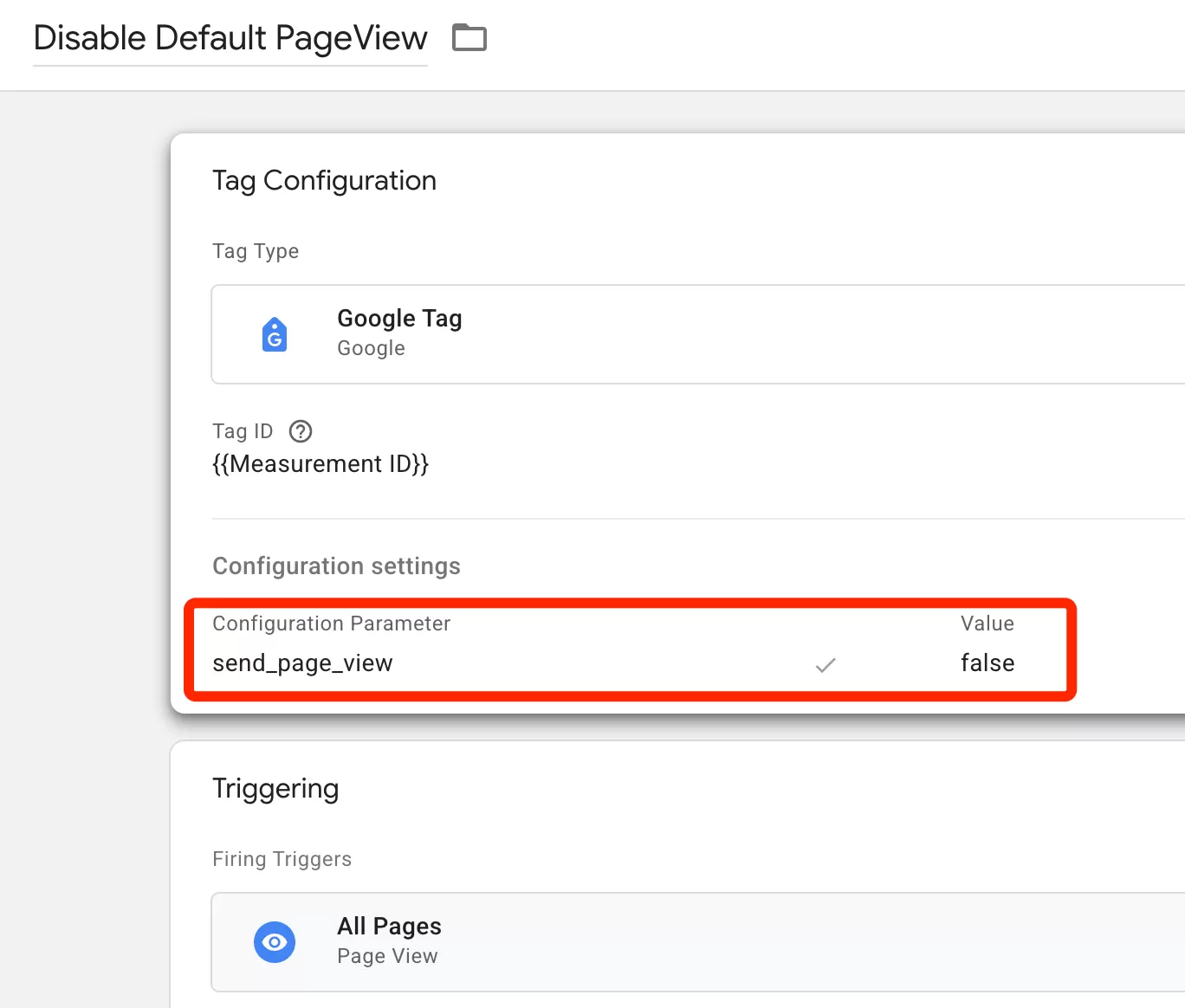
Setting send_page_view to false means the Google Tag will still load and initialize GA4, but it won’t automatically fire a page_view event with the sandbox URL.
Step 2: Send a Custom Event from Shopify
Now you need to push the real page information to the data layer so GTM can grab it.
Copy the following code into your Shopify Custom Pixel:
analytics.subscribe('page_viewed', (event) => {
  window.dataLayer.push({
   'event': 'page_viewed',
   'page_location': event.context.window.location.href,
   'page_title': event.context.document.title,
  });
});
What this does: every time Shopify detects a page view, it pushes an event to the data layer containing the actual browser URL and page title — not the sandbox path.
Step 3: Configure GTM Variables
Next, you need to create two Data Layer Variables in GTM so your tags can read the values from the data layer.
In GTM, click「Variable」——「New」——「Choose a variable type to begin setup…」——「Data Layer Variable」, name it “dlv_page_location”, and then make the following settings: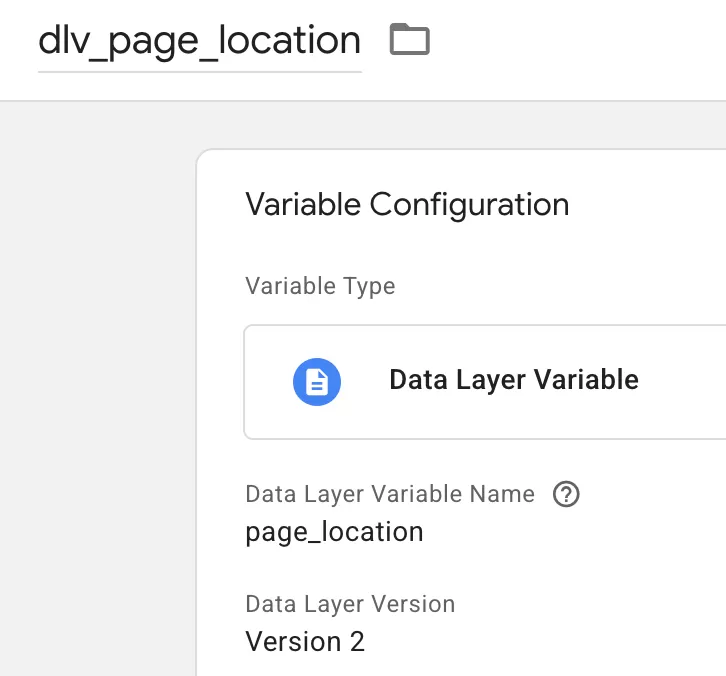
Similarly, create the data layer variable dlv_page_title.
Step 4: Create a Custom Event Trigger
Now you need a trigger that fires when the custom event from Shopify comes in.
In GTM, click「Trigger」——「New」——「Choose a trigger type to begin setup…」——「Custom Event」, name it “page_viewed”, and then make the following settings: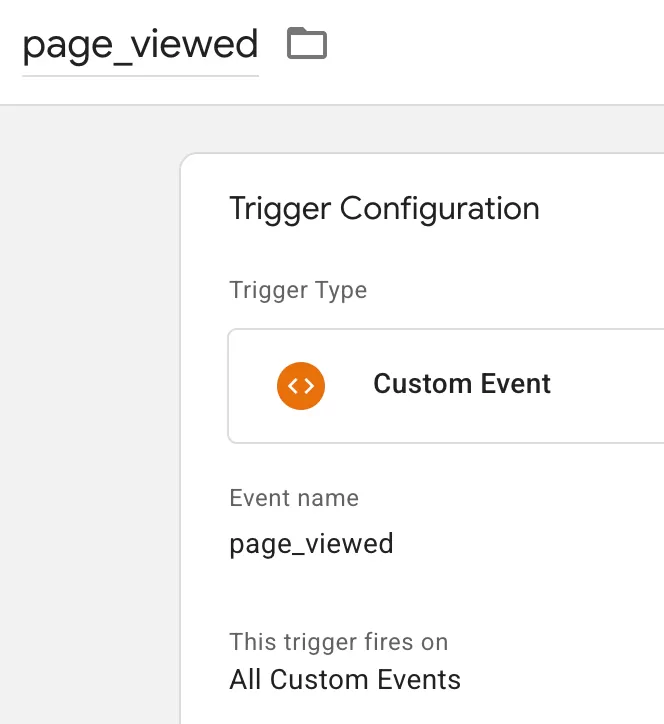
This trigger will fire every time the page_viewed event is pushed to the data layer from your Shopify pixel.
Step 5: Create GA4 Event Tag
Finally, create a GA4 event tag that sends the clean data.
In GTM, click「Tags」——「New」——「Choose a tag type to begin setup…」——「Google Analytics」——「Google Analytics: GA4 Event」, name it “GA4-Event-PageView”, and then make the following settings: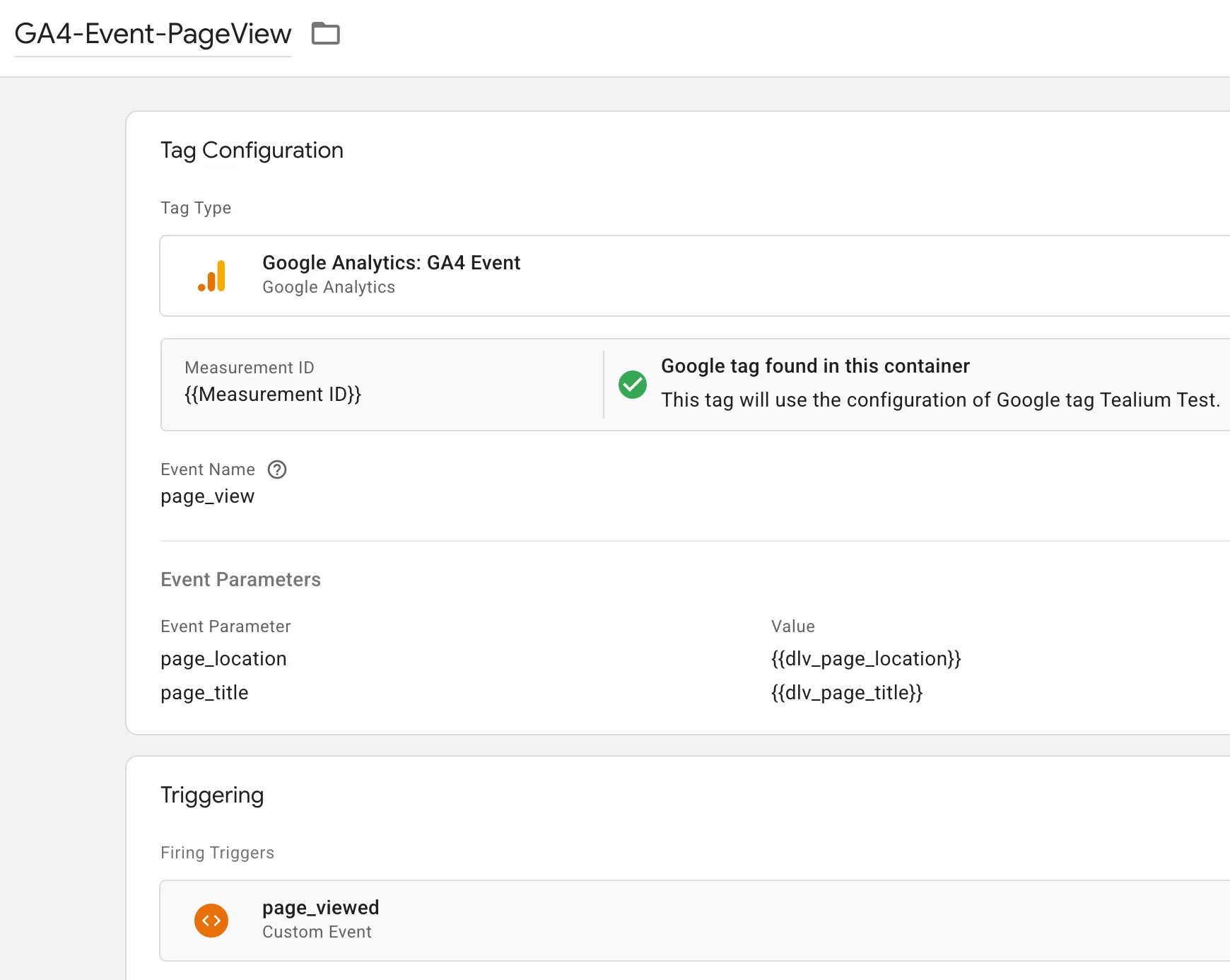
Notice the event name is page_view — the same as the default GA4 page view event. That means GA4 will treat these events the same way it treats normal page views, but with clean URLs.
Step 6: Preview, test, and publish
Before publishing, use GTM Preview mode to verify everything is working。
If everything looks good, publish the container.
Step 7: Verify Data in GA4 Report
After 24 hours, check your GA4 Pages and screens report. You should see clean, readable URLs instead of the garbled sandbox paths.
Final Words
This issue is one of those things that feels scary at first — your URLs look broken, you don’t know why, and you assume something is wrong with your setup. But the fix is actually quite clean once you understand what’s happening: disable the default tracking that captures the sandbox URL, and use a custom event to send the real one.
Have you encountered other quirks with Shopify Custom Pixel and GA4? Drop a comment and share your experience.