Update time: June 23, 2025
If you’ve ever compared user counts in a GA4 standard report against what you see in a custom exploration or BigQuery, you might have noticed something strange. The numbers don’t match. The same metric shows different values in different places, and nothing seems wrong with your setup.
You’re not alone, and your tracking isn’t broken. The explanation is simpler than you might think: not all metrics in GA4 are based on exact counts. Some are estimated.
In this article, I’ll explain which metrics are estimated, why Google does it this way, and how you can calculate those same estimates in BigQuery yourself.
Why are there Estimated Metrics?
When you see a metric like Sessions or Active Users in a GA4 report, you’re probably looking at an approximation, not an exact count. Google uses a probabilistic algorithm called HyperLogLog++ (HLL++) to estimate cardinality — that is, the number of unique items in a dataset.
Why not just count them exactly? The short answer is performance. Counting exact distinct values for large datasets is expensive. It takes a lot of memory and processing power, especially at Google’s scale where millions of events pour in every minute. HLL++ gives you a result that’s very close to the real number while using a fraction of the resources.
Here’s the catch: because these are estimates, you might see small differences between reports that query the same metric but use different aggregation logic.
How estimated metrics affect your reports
There are two main effects you’ll notice when working with estimated metrics:
- Estimated metrics differ from actual counts. The number you see in a report is not the exact number of distinct users or sessions. It’s an approximation. In most cases, the difference is negligible, but it can be noticeable with smaller segments or highly filtered views.
- The same metric can show different values in different reports. A standard GA4 report might show 1,234 Active Users, while an exploration with the same date range shows 1,241. This isn’t a bug — it’s because each report might use different precision levels or aggregation methods for the estimation.
Don’t panic. Your data is not corrupt, and you haven’t misconfigured anything. This is expected behavior.
Sessions
Sessions in GA4 are estimated by counting unique session IDs using HLL++.
In BigQuery, the standard way to count sessions is to combine user_pseudo_id and ga_session_id and feed them into the HLL++ functions. The precision parameter here is 12, which gives a solid balance between accuracy and performance.
Here’s the query:
SELECT
  HLL_COUNT.EXTRACT(
    HLL_COUNT.INIT(
      CONCAT(
        user_pseudo_id,
        (SELECT `value` FROM UNNEST(event_params) WHERE key = 'ga_session_id' LIMIT 1).int_value),
      12)) AS session_count,
FROM `table.events_*`
If you’re wondering what that precision value means: higher numbers give better accuracy at the cost of more memory. Google chose 12 for sessions because it’s good enough for reliable reporting without bogging things down.
Active Users
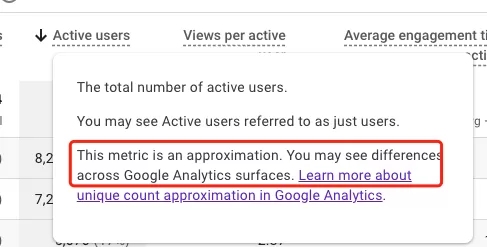
Active Users is also an estimate, and you may see differences across GA4 surfaces for the exact same date range.
To calculate Active Users from a BigQuery export, you first need to filter for events where the user was actually engaged. A user is considered active when either engagement_time_msec is greater than 0 or session_engaged equals '1'.
Here’s how it looks in BigQuery:
WITH ActiveUsers AS
(
  SELECT
    user_pseudo_id
  FROM
    `table.events_*`
  WHERE
  (SELECT value.int_value FROM UNNEST(event_params) WHERE key = 'engagement_time_msec') > 0 OR (SELECT value.string_value FROM UNNEST(event_params) WHERE key = 'session_engaged') = '1' GROUP BY user_pseudo_id )
)
SELECT
  HLL_COUNT.EXTRACT(HLL_COUNT.INIT(user_pseudo_id, 14)) AS active_user_count,
FROM ActiveUsers
Notice that the precision for Active Users is 14, not 12. That’s higher than sessions, which means Google expects a larger cardinality here and wants better accuracy.
Total Users
Total Users is estimated the same way as Active Users, but without the engagement filter. It’s a straight count of distinct user_pseudo_id values across all events.
The BigQuery query is refreshingly simple:
SELECT
  HLL_COUNT.EXTRACT(HLL_COUNT.INIT(user_pseudo_id, 14)) AS total_user_count,
FROM `table.events_*`
Same precision level (14) as Active Users.
Final Words
Hopefully, this article shed at least some light on why GA4 metrics don’t always match up between reports and why the numbers you see are not always exact counts. The estimation is not a limitation you need to work around — it’s a deliberate tradeoff that makes GA4 fast and scalable.