Updated: April 23, 2026
If you’ve migrated from Universal Analytics to GA4 and noticed a channel called Cross-network in your reports:
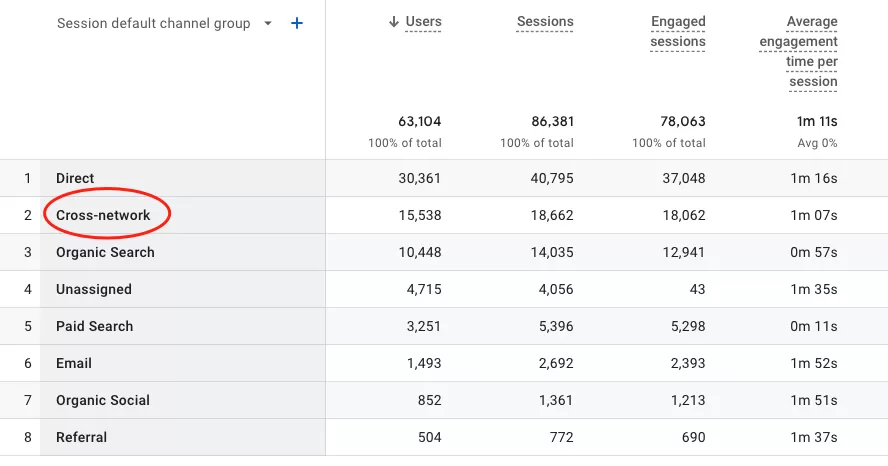
You’re probably scratching your head. Traffic from Google Ads — shouldn’t it show up under Paid Search or Display? Why is there a catch-all category that didn’t exist before?
Let’s unpack what Cross-network actually is, why Google created it, and why your Demand Gen and Performance Max campaigns end up there instead of where you’d expect.
What Is Cross-Network in GA4?
Cross-network is a new default channel grouping in GA4 that didn’t exist in Universal Analytics. And honestly, it’s one of the more confusing additions — especially if you’re used to the clean separation of Paid Search, Display, and Social channels in UA.
Here’s Google’s official definition:
Cross-network represents traffic driven by ads that run across multiple Google ad networks (e.g., Search, Display, YouTube, Discover).
That phrase — “across multiple networks” — is where most of the confusion starts. If a campaign runs on Search and Display, why doesn’t GA4 just split the traffic into those two channels?
Let me explain.
Which Campaigns End Up in Cross-Network?
In GA4, Cross-network isn’t a random leftover bucket. It’s a specific grouping for campaign types that Google designed to run across multiple ad surfaces at the same time.
Here are the main ones:
- Demand Gen — runs on YouTube, Discover, and Gmail
- Performance Max — covers YouTube, Display, Search, Discover, Gmail, and Maps
- Smart Shopping — serves ads across Search, Display, YouTube, and Gmail
Think about it: if a Performance Max campaign is running on six different Google properties simultaneously, which channel should it go under? Paid Search? Display? YouTube? There’s no right answer — because it’s all of them at once.
That’s where Cross-network comes in.
How GA4 Actually Classifies It
Here’s the exact logic GA4 uses to assign traffic to Cross-network:
Source platform is “Google Ads”
AND
Google Ads ad network type is one of (“Cross-network”)
Cross-network includes Demand Gen, Performance Max and Smart Shopping.
OR
Google Ads campaign type is one of (“Performance Max”, “App”, “Smart”, “Demand Gen”, “Local”)
When those conditions are met, GA4 consolidates everything under one channel — Cross-network — instead of trying to split traffic across multiple channels.
It’s not perfect, but it makes sense. These campaigns don’t belong to a single channel, and Google’s algorithms optimize delivery across networks dynamically. GA4 gives you a single view of that cross-channel performance rather than forcing a fictional split.
Final Words
Cross-network in GA4 can look like a confusing catch-all at first glance, but it’s actually a well-defined grouping for campaigns that span multiple Google ad surfaces. If your Performance Max or Demand Gen traffic shows up there instead of under Paid Search or Display, that’s working exactly as intended.