Update time: December 18, 2025
If you’ve been looking at GA4’s Real-time report lately, you might have noticed something strange. Two new event parameters keep showing up: batch_ordering_id and batch_page_id.
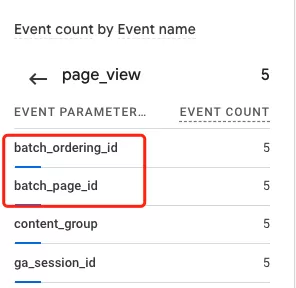 They appear automatically on every event, they can’t be configured, and there’s not much official documentation about what they actually do.
If my guess was correct, you have come to the right place. In this article, I’ll break down what these parameters are, how GA4 generates them, and when you should (and shouldn’t) care about them.
What is batch_ordering_id?
GA4 has a feature called event grouping. Instead of sending every single event as its own network request, GA4 bundles multiple events together into a single request (or “batch”) to optimize network performance. That’s great for efficiency, but it can make it harder to figure out the original sequence of events.
That’s where batch_ordering_id comes in.
batch_ordering_id is a monotonically increasing number that increments each time GA4 sends a network request — a batch — from the same page. Think of it as a “batch sequence number” for that page.
Here’s a concrete example. Let’s say a page loads and triggers five events in quick succession: Event 1, Event 2, Event 3, Event 4, and Event 5. GA4 might batch them like this:
| Event | Batch | batch_ordering_id |
|---|---|---|
| Event 1 | First batch | 1 |
| Event 2 | Second batch | 2 |
| Event 3, Event 4, Event 5 | Third batch | 3 |
Even though five events were triggered, only three network requests were sent. The batch_ordering_id parameter tells you — and downstream systems like BigQuery — the order in which those batches were sent from that page.
So if you’re looking at raw GA4 event data in BigQuery and the original sequence matters, batch_ordering_id is your friend.
What is batch_page_id?
batch_page_id is a bit different. It’s a sequential number assigned to a page that increases for each subsequent page within an engagement.
In practice, though, it’s simpler than it sounds.
batch_page_id is a 13-digit millisecond timestamp. It corresponds to the timestamp of the event that triggered the batch.
Here’s the interesting part: it’s closely related to the value stored in the GA4 cookie _ga_<container-id>.
Let’s use a real example. Say an event fires on bbccss.com.
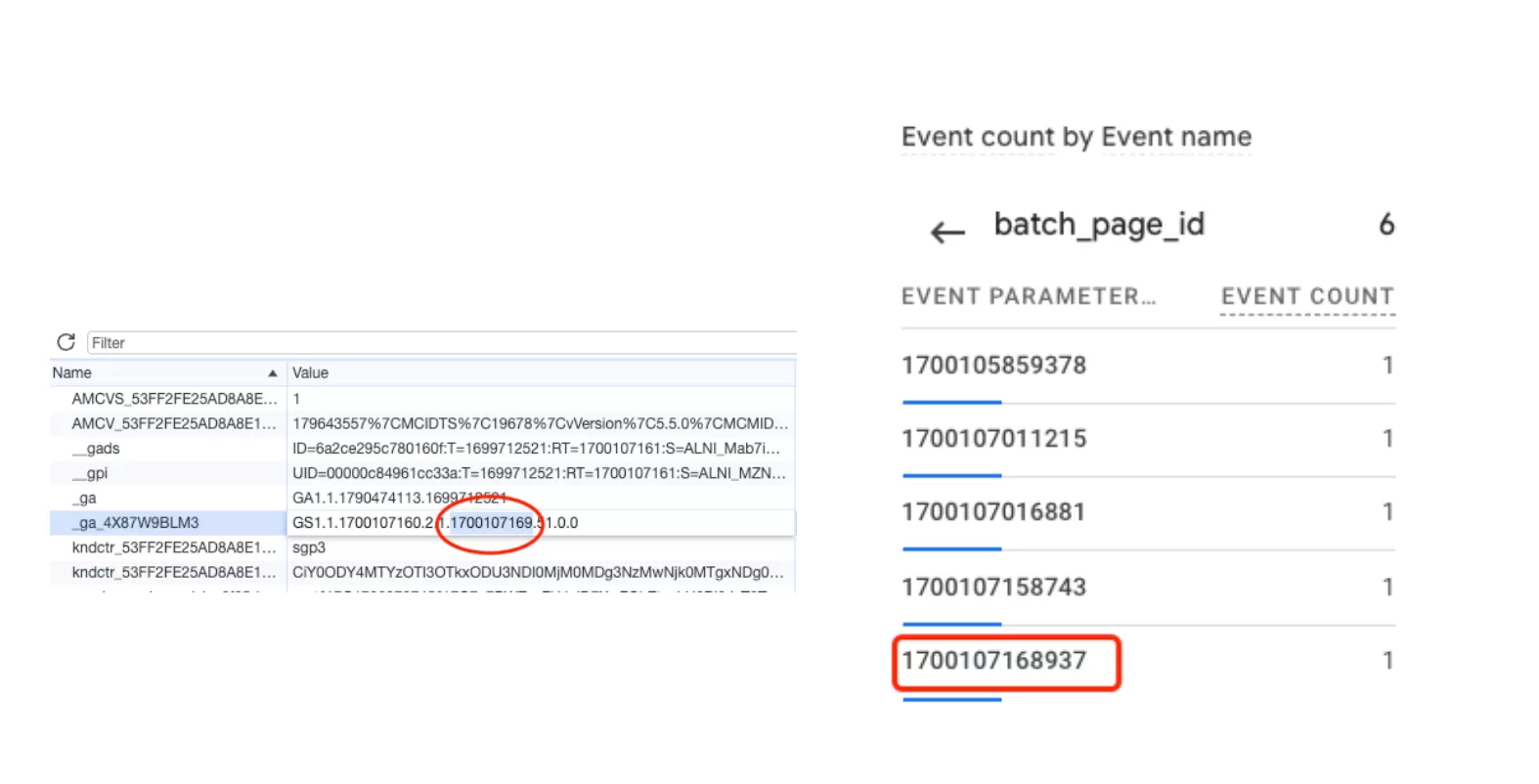
- The current timestamp in
_ga_<container-id>is1700107169(10 digits, in seconds) - The
batch_page_idis1700107168937(13 digits, in milliseconds)
The relationship is straightforward:
current timestamp=batch_page_id/1000
So batch_page_id is essentially the millisecond-level version of the page timestamp stored in that GA4 cookie. It tells you, with millisecond precision, when the page context for that event was established.
When should you care about these parameters?
Honestly, for most day-to-day GA4 work in the standard UI, you probably won’t need these. These are behind-the-scenes parameters that GA4 generates automatically, and you can’t configure or modify them.
You’ll most commonly encounter batch_ordering_id and batch_page_id when:
- Analyzing raw GA4 event data in BigQuery — if you’re writing SQL queries against the event export, these parameters can help you reconstruct event sequences and page boundaries with more precision
- Debugging event order issues — if events appear out of sequence in BigQuery,
batch_ordering_idhelps you understand which batch they arrived in - Working with batched Measurement Protocol or gtag.js requests — understanding how GA4 groups events helps you interpret the raw request payloads
- Reconstructing page-level event sequences —
batch_page_idcombined withbatch_ordering_idgives you a pretty clear picture of what happened on each page】
Final Words
batch_ordering_id and batch_page_id aren’t the kind of parameters you’ll use every day, but when you’re down in the weeds with raw GA4 data in BigQuery, they make a real difference. One helps you reconstruct the batch order, the other gives you a precise page-level timestamp — both without you having to configure anything.
Hopefully, this article shed at least some light on them. Now I pass the torch on to you — have you run into these parameters in your own BigQuery exports? Any unexpected behavior? Drop a comment and share your experience.